
Run a complete SDK workflow
Need another feature? Use the developer toolbox to find its API, inspect required fields and preview a request before executing it.
Start with a backend you control. These downloadable Node examples use the published
@creekx/[email protected] package to create a stream safely, issue a short-lived
playback link and receive signed events. The API key stays on your backend.
On this page
1. Prepare an isolated example folder
Use Node.js 22 or newer and CreekX server 2026.11.17 or newer. The provisioning example depends on that server release's idempotency handling; older servers may ignore the header. Upgrade before using it. On macOS or Linux:
mkdir creekx-sdk-examples
cd creekx-sdk-examples
npm init -y
npm install @creekx/[email protected]
for file in sdk-common.mjs sdk-provision-stream.mjs sdk-private-playback.mjs sdk-webhook-receiver.mjs; do
  curl -fsSLO "https://creekx.io/docs/examples/$file"
done
On Windows, create the folder, run the same npm commands, and use PowerShell to download the files:
$files = 'sdk-common.mjs','sdk-provision-stream.mjs','sdk-private-playback.mjs','sdk-webhook-receiver.mjs'
foreach ($file in $files) {
  Invoke-WebRequest "https://creekx.io/docs/examples/$file" -OutFile $file
}
You can also save them individually: shared configuration, stream provisioning, private playback, and webhook receiver. Keep all four in the same folder.
2. Keep configuration outside source control
Create a local .env file, replace the placeholders and add that file to your
project's ignore rules:
CREEKX_SERVER=https://video.example.com
CREEKX_API_KEY=REPLACE_WITH_YOUR_SERVER_SIDE_API_KEY
CREEKX_STREAM_NAME="SDK example"
CREEKX_IDEMPOTENCY_KEY=REPLACE_WITH_ONE_STABLE_OPERATION_ID
Use the origin without /v1, a query or a credential in the address. The
examples reject redirects and remote plaintext HTTP, set a ten-second request timeout and
do not print server response bodies. Plain HTTP is accepted only for a local loopback lab.
Use an API key with the permissions needed for the example. Keep it out of browser bundles, mobile apps, screenshots and shared terminal transcripts. Read the API key guide.
3. Provision a stream without accidental duplicates
node --env-file=.env sdk-provision-stream.mjs
node --env-file=.env sdk-provision-stream.mjs --apply
The first command validates the plan without sending a request. The second calls
POST /v1/streams with your supplied idempotency key. It prints the stream ID
and name; it does not reveal a publishing key, create a public watch link or start a
publisher.
If the response is lost, rerun with the same name and same key. Within
the server's deduplication window, this recovers the same stream. Different settings with
that key return 409. A genuinely new operation needs a new key.
The current server retains idempotency records for one day. After that window, reconcile your stored stream ID with CreekX before retrying; this is not a permanent uniqueness guarantee. Persist the operation key and resulting ID in your application.
Check: rerun the command with the same key, then inspect Streams. You should have one stream with the same ID. This example leaves that stream in your server; remove only your own test stream when finished.
4. Issue a private playback token
Add the returned stream ID to .env:
CREEKX_STREAM_ID=REPLACE_WITH_THE_STREAM_UUID
CREEKX_TOKEN_SECONDS=300
node --env-file=.env sdk-private-playback.mjs
node --env-file=.env sdk-private-playback.mjs --issue
node --env-file=.env sdk-private-playback.mjs --issue --show-link
The default is a dry run. --issue creates a play token but prints only its
metadata. Adding --show-link deliberately reveals the private watch URL:
anyone holding it may use it until it expires, subject to your stream rules. Do not copy
it into public logs or tickets.
The example allows a lifetime from 60 to 900 seconds. Add --one-viewer to
bind it to the first viewer address. This identifies a network address, not a person;
shared office networks can share that address.
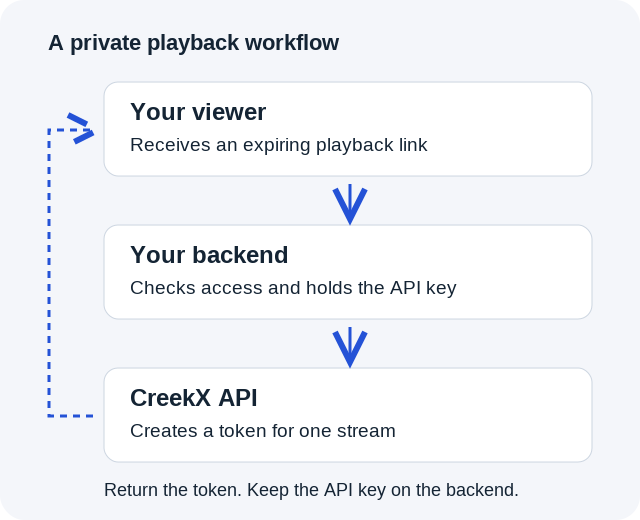
In a real application, authenticate the viewer and check their entitlement before minting
a token. Pass the resulting token as the web player's code, not as an API
key. A token grants access; it does not make an offline stream start broadcasting. Follow
the player integration guide and
viewer access checks.
5. Verify webhooks before processing them
Use the signing secret shown when you register your webhook, not your API key. Keep it in
.env:
CREEKX_WEBHOOK_SECRET=REPLACE_WITH_THE_WEBHOOK_SIGNING_SECRET
CREEKX_WEBHOOK_PORT=4700
node --env-file=.env sdk-webhook-receiver.mjs
The receiver listens only at http://127.0.0.1:4700/webhooks/creekx. A remote
CreekX server cannot reach your loopback address: expose your application through a
trusted HTTPS reverse proxy and register that public callback URL. Configure it in
Developers and webhooks.
- The receiver accepts JSON POST bodies up to 64 KiB.
-
It sends the exact raw body and
CreekX-Signatureheader to the SDK verifier before trusting the event. -
A successfully processed duplicate is acknowledged without repeating the callback. A
delivery still in progress receives
503so it can be retried. -
The response is successful only after
onEventfinishes. A failed callback returns500and may be retried.
The example logs only event ID and type. Replace onEvent with a durable queue
or transaction. The in-memory deduplication cache is bounded to 1,000 events and expires;
it resets on restart and is not shared between processes. Production handlers need a
durable unique event ID and idempotent side effects. This example does not provide
exactly-once processing.
Check: use the server's test-webhook action. Then test a repeated delivery and a changed body. Valid repeats should not repeat the side effect; an invalid signature must be refused. Read how retries and acknowledgements work.
6. Import read-only API checks
Download the Postman collection. Import it into Postman or a compatible API client, set server and
streamId, and keep apiKey in your private local environment.
All five requests are GET requests: readiness, streams, one stream's status, library assets and webhook registrations. The collection does not create streams, reveal publisher keys or issue tokens. Readiness needs no API key; other responses depend on your role. A blank stream ID or an insufficient permission will produce an error rather than inventing a working result.
What was verified
These examples were tested with the npm SDK version pinned above against a local CreekX API. The tests simulated a lost create response and recovered the same stream, issued and checked a private play token, and verified webhook HMAC signatures, duplicate handling, changed-body rejection and stale or excessive future timestamps. Only the uniquely named proof stream was created and removed.
Those are API and event-handling checks. They do not prove video playback on your cameras, network or native mobile devices. Use the live-event checklist for a real source-to-viewer test. The examples do not add new SDK methods or change the installed product.