
Ads and suggestions beside worship
Embed the player on your own site. The service plays on a page you control, beside your own notices and giving link, with no adverts and no suggested videos from creekX.
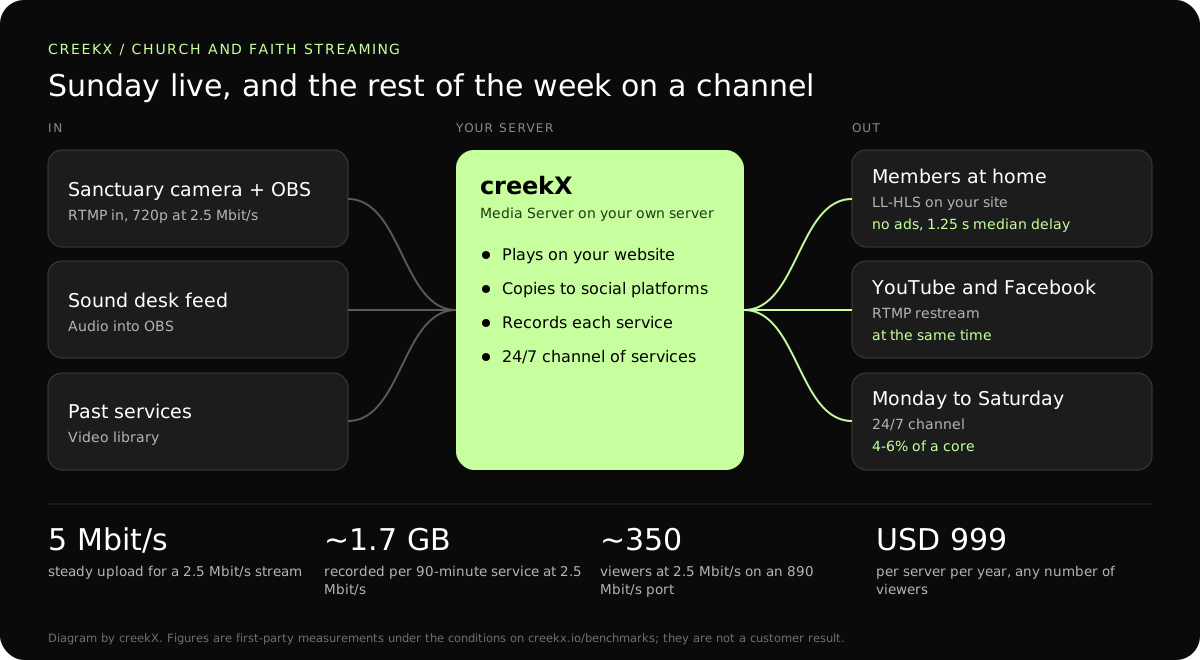
A congregation watching on social platforms sees ads and suggested videos beside the service. CreekX puts the service on your own website, sends it to YouTube and Facebook at the same time, and plays past services around the clock.
Most churches began streaming on a social platform because it was free and already there. The cost shows later: an advert before the sermon, a suggested video beside the prayer, a service muted or taken down by an automatic music match, and a congregation whose weekly habit lives on someone else’s site.
Embed the player on your own site. The service plays on a page you control, beside your own notices and giving link, with no adverts and no suggested videos from creekX.
Restream to YouTube and Facebook at once. One feed from the sanctuary goes to your website and to the platforms together; creekX copies it without re-encoding, so a modest server is enough.
Run a 24/7 channel of past services, so a member who opens the page on a Wednesday finds a service playing rather than an empty player. The schedule refills itself from the services you choose.

OBS and a camera, or a hardware encoder. Take sound from the mixing desk rather than the camera microphone; it matters more than picture quality. Steps: go live from OBS.
Your site plus social platforms. Add each platform once with its stream key, tick it on the stream, and it receives every service from then on. Steps: YouTube, Facebook and more at once.
Recordings into a 24/7 channel. Turn on recording, and each service is in the library when it ends, ready to add to the channel. Steps: put a video library on air.
A service does not need sub-second delay. It needs to start on time and play without stalling on a phone in a kitchen. That points to the simplest path in and HLS out.
| Leg | Protocol | Measured delay | Why |
|---|---|---|---|
| OBS in the sanctuary to the server | RTMP | Not measured separately | OBS speaks it out of the box. Use SRT only if the line drops packets. |
| Server to members at home | Low-latency HLS | 1.23-1.28 s median, 1.40 s worst | Plain HTTPS; plays in any current browser and on phones. |
| Server to smart TVs and older devices | HLS | 3.4-3.8 s median, 4.4 s worst | The widest device support. |
| Server to an overflow room in the building | WebRTC | 0.49 s median, 0.68 s worst | The room can hear the sanctuary, so the picture must keep up. |
| Server to YouTube and Facebook | RTMP restream | The platform’s own delay | Reach, from the same single feed. |
A weekly service is a small load for a streaming server. The figures below are worked from our own measurements on a 4 vCPU, 8 GB server.
A 4 vCPU server is more than this needs. We have not measured a smaller server, so the trial is the place to find out what yours carries.
In a first-party test on 13 October 2026, CreekX 2026.10.13 measured a median delay of 0.49 seconds for WebRTC, with a worst result of 0.68 seconds. Low-latency HLS measured 1.23-1.28 seconds at the median and 1.40 seconds at worst. Standard HLS measured 3.4-3.8 seconds at the median and 4.4 seconds at worst. The test used the standard one-line installer on an Ubuntu 24.04 cloud server with 4 vCPU, 8 GB memory, a 100 GB NVMe disk and about 890 Mbit/s upload bandwidth. The source was a real 1080p, 25 fps H.264 clip at 5 Mbit/s, sent from OBS and viewed on a laptop over the local network. Each step ran for 60 seconds. These are product measurements under the stated conditions, not results from a customer deployment or a promise for each viewer.
CreekX has no telemetry and can run with an offline licence and offline installation package supplied through sales. Video and the installed product’s operational account data remain on the customer-controlled server during local operation. Website and sales enquiries are separate. Enabling an off-site backup, external storage, restream destination or another outbound integration creates a corresponding outbound data path. Recorded video and library files are not encrypted by CreekX on the customer’s disks; use server-level disk encryption when encryption at rest is required. Viewer-security features have been checked through CreekX automated tests, but no formal third-party security certification or assessment has been completed.
The 14-day Media Server trial is available without a credit card. It includes the Media Server feature set with trial limits of five 24/7 channels, five restream destinations per stream and 500 library videos. Installation requires an internet connection. Your content is kept when the trial ends. Add a paid licence to continue using licensed features and creating channels after the trial and any applicable licence grace period.
Contact CreekX first if the deployment must be fully offline or air-gapped, will use several servers or more than 50 concurrent live streams, expects thousands of viewers, forms part of a tender, or needs installation, training or Enterprise support. CreekX currently operates one server per installation, so the team should check hardware, network capacity and product fit for a large audience before the trial.
Someone comfortable installing software on an Ubuntu server, or ask CreekX for help. Installation is one command, and the weekly work is pressing Start Streaming in OBS. A server needs occasional care: updates, and an eye on disk space. Done-for-you installation and training are paid services.
Yes, at the same time as your own site. The platforms apply their own rules, including automatic music matching, to the copy they receive; your own website’s copy is not affected by them.
About twice your stream’s bitrate per camera, tested for the length of a service: 5 Mbit/s of steady upload for a 720p stream at 2.5 Mbit/s. Use a wired connection for the streaming computer, not the building’s Wi-Fi. More: how much upload speed live streaming needs.
Media Server Pro is USD 999 per server a year, or USD 99 a month, with no charge per viewer or per service. On top you rent or own a server and its internet connection. The 14-day trial is free and needs no card.
Yes. Leave the public watch link off and send the family a private link that expires. Nobody without the link can watch, and it is not listed anywhere.
creekX does not check, license or mute music. Streaming copyrighted music needs the appropriate licence from your own licensing body, on your own website as much as on a platform.
On a smart TV’s browser or by casting from a phone, through HLS. creekX has no television apps of its own. For a screen in the church hall, the Android kiosk player locks a screen to one stream.
The stream stops until it returns, and OBS reconnects by itself. Record in OBS as well as on the server, so the full service can be uploaded afterwards. The live stream recovery drill covers what to practise.
Run the trial during a rehearsal, then go live the following week.