
Every site has its own recorder and app
Group cameras from many sites on one wall and one login. Each camera gets a site name, and the wall, playback and permissions all follow that grouping, instead of one app per recorder.
CreekX Cameras finds ONVIF cameras on your network, shows them live on one wall grouped by site, records them and lets you limit each person to the sites they look after. It runs on a server you control, with no camera cloud and no fee per camera to a video platform.
A recorder in a cupboard works for one building. It stops working as a system when there are six buildings, three camera brands and a manager who wants last Tuesday’s footage from a site two hours away. The usual fix is a camera cloud, which means a monthly fee per camera and footage that leaves the network.
Group cameras from many sites on one wall and one login. Each camera gets a site name, and the wall, playback and permissions all follow that grouping, instead of one app per recorder.
Cameras are pulled over RTSP on your own network and recorded to your own disks. creekX sends no telemetry, and nothing goes to an outside cloud unless you add an integration such as an off-site backup.
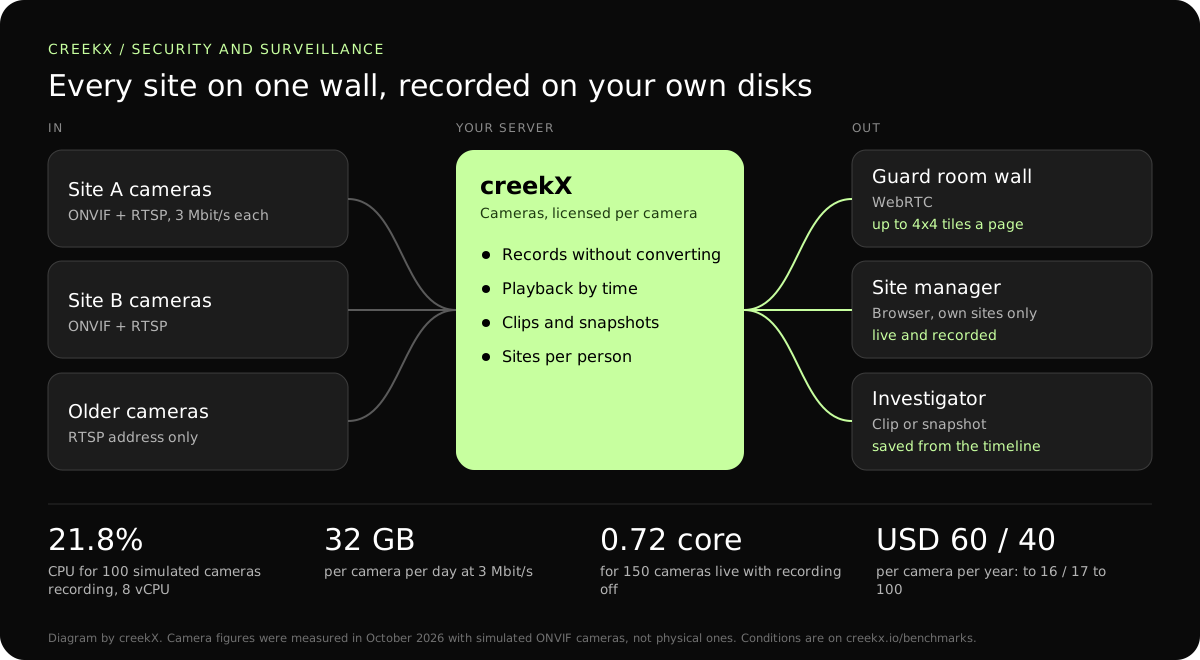
Limit each person to named sites. They see only those cameras, live and recorded, and the server enforces it rather than the browser. Every viewer connection is logged with its address, device and time.
Three steps take a new site from a list of cameras to a recorded wall. The longer walk-through is in the self-hosted security camera system guide and the product steps in creekX Cameras, step by step.
Run ONVIF discovery from the server and pick cameras from the list, or paste an RTSP address for a camera that does not answer ONVIF. Camera passwords are stored sealed with AES-256-GCM and never shown again.
Show cameras as 2x2, 3x3 or 4x4 tiles, grouped by site, on a wall screen, a laptop or a locked Android kiosk display. Cameras that support it can be panned, tilted and zoomed from the browser.
Record continuously, move through the timeline to the minute you need, and save a clip or snapshot for an incident. If a camera stops answering, creekX keeps retrying and raises a camera-offline alert.
A camera system has three legs, and each has a protocol that suits it. The camera side is fixed by the camera. The viewing side is chosen per screen.
For one camera on a web page, without the wall or recording timeline, Media Server alone is enough: put an IP camera on a website without a cloud.
| Leg | Protocol | Figure | Notes |
|---|---|---|---|
| Camera to server | RTSP video, ONVIF control | 3 Mbit/s per 1080p camera in our test | Stays on your own network. The camera never faces the internet. |
| A remote site to the server | SRT with an AES passphrase | Not measured separately | Re-sends lost packets and encrypts the feed across the internet. |
| Server to a live wall | WebRTC | 0.49 s median, 0.68 s worst | Operators see events as they happen. |
| Server to a phone or laptop elsewhere | Low-latency HLS or HLS | 1.23-1.28 s or 3.4-3.8 s median | Plain HTTPS; works where WebRTC is blocked. |
| Server to a public web page | HLS | 3.4-3.8 s median | Viewers connect to the server, never to the camera. |
Camera servers are sized by disk and network first. In our test on 15 October 2026, an 8 vCPU, 16 GB server recorded 100 simulated ONVIF cameras at 1080p and 3 Mbit/s at 21.8% CPU and about 1.1 GB of memory. With recording off, 150 cameras used 0.72 of a core.
Storage is the largest cost, and it is yours to choose: retention days and camera bitrate set it. Not measured: physical cameras, H.265, viewers and recording under load together, and days of running. Wider context is in the IP camera streaming server guide.
On 13 October 2026, CreekX 2026.10.13 was installed using the standard one-line installer on Ubuntu 24.04. The test server had 4 vCPU, 8 GB memory, a 100 GB NVMe disk and about 890 Mbit/s upload bandwidth. It received a real 1080p, 25 fps H.264 test clip at 5 Mbit/s, and each test step ran for 60 seconds.
All 49 streams remained live. CreekX reported 13% CPU across the four cores, 1.5 GB memory use and 30.6 MB/s of disk writes. The CPU figures exclude the test tools.
The inputs were not validated physical cameras. The test therefore measures concurrent recorded streams under the stated conditions, not broad camera compatibility or a fixed number of cameras for another server.
At the tested 5 Mbit/s rate, one 1080p stream produces about 2.3 GB per hour, or about 55 GB per day. Retention requirements and disk performance should be included when sizing a deployment.
CreekX reports HTTPS for the application and video, encrypted WebRTC media, encrypted SRT ingest and AES-256-GCM protection for stored credentials. Recorded video is not encrypted by CreekX on the customer’s disks; deployments requiring encryption at rest need server-level disk encryption. Optional off-site backups, storage services or other outbound integrations create data paths outside the server when the customer enables them. CreekX currently has no formal security certification, independent penetration test or external audit.
CreekX Cameras is intended for mid-sized and large organisations with a technical owner and a need to view or record camera feeds on customer-controlled infrastructure.
Yes. It is licensed per camera, separately from Media Server: USD 60 per camera per year up to 16 cameras, USD 40 from 17 to 100, and by quote above that or across several servers. It is not part of the 14-day Media Server trial; it starts with an assisted pilot on your own cameras.
No. The current release shows, records and shares camera video. It does not analyse it, so there are no motion, person or number-plate alerts. If analytics decide the purchase, say so before the pilot.
Yes, with an offline licence and installation package supplied through sales. Cameras, server and viewers then all sit on your own network, and upgrades arrive as offline packages. Details: on-premise and offline deployment.
Bitrate times time. A 1080p camera at 3 Mbit/s writes about 32 GB a day, so 30 days is about 970 GB per camera. Halving the camera’s bitrate halves the disk. creekX does not convert the video, so the camera’s own settings decide the size.
Cameras with ONVIF or an RTSP address, from any vendor. Cameras that rely only on the ONVIF Media2 profile are not supported yet. Our tests used simulated cameras, so check your exact models in the pilot.
Yes. creekX pulls a second stream from each camera, so an existing recorder can keep running beside it while you compare. Most cameras allow several RTSP connections; check the limit on older models.
In transit, yes: the app and video use HTTPS and WebRTC media is encrypted. On disk, no: use disk encryption on the server when you need encryption at rest. CreekX has no formal security certification or outside audit yet.
Tell us how many cameras and sites you have, how long you keep recordings and who needs to see what, and CreekX will size it with you.