Education and Live Classes

Live lectures for enrolled students, on the school’s own servers

Schools and training providers stream classes that only enrolled students should see, and students revise from the recordings. CreekX signs students in, brings in guest teachers and keeps every lecture.

01triggers

When classes go online

A lecture streamed on a public platform is open to anyone with the link and sits beside unrelated videos. A lecture run on a meeting tool caps the room and records to a vendor’s cloud. A school usually wants neither: it wants enrolled students only, a recording it owns, and a bill that does not grow with every hour watched.

Only enrolled students should watch

Single sign-on or private links. Students sign in with the school account through OpenID Connect, or a course is shared by a private link that expires at the end of term. Viewing can also be limited to campus network addresses.

Guest teachers join remotely

Bring them in as live guests. A browser room takes up to five guests with their cameras, so a visiting lecturer needs only a link.

Students revise later

Recordings and captions in a library. Captions are made on your own server, and every spoken word becomes searchable, so a student can find the ten minutes on a topic. Caption accuracy has not been measured; correct technical terms before relying on them.

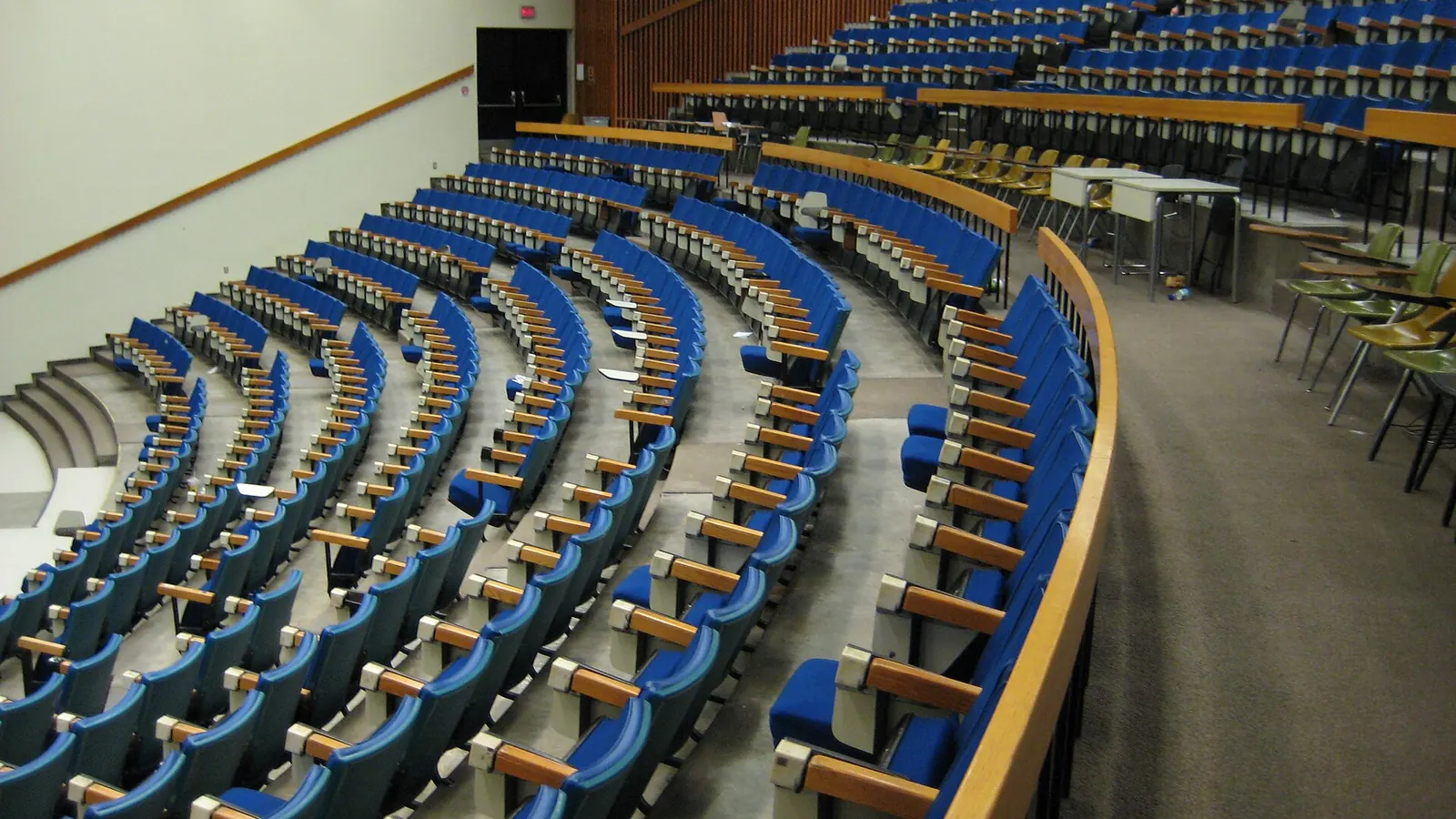
An empty university lecture hall with curved rows of blue seats rising from the front
A hall this size seats a few hundred. The same lecture can reach every enrolled student who could not be in it, and be there again before the exam.
02process

How it works

Stream from the lecture hall

A camera and encoder, or a browser. A fixed hall camera with an encoder runs unattended; a seminar can go live from the teacher’s laptop browser with no software, which needs the server at an https address. Steps: go live from your browser.

Sign students in

Your identity provider, through OpenID Connect. Restrict sign-in to the school’s email domain and set the role students join as. SAML is not supported. Steps: single sign-on.

Keep the lecture

Recorded, captioned, searchable. Turn on recording and automatic captions once; each lecture then appears in the library when it ends. Steps: captions and search.

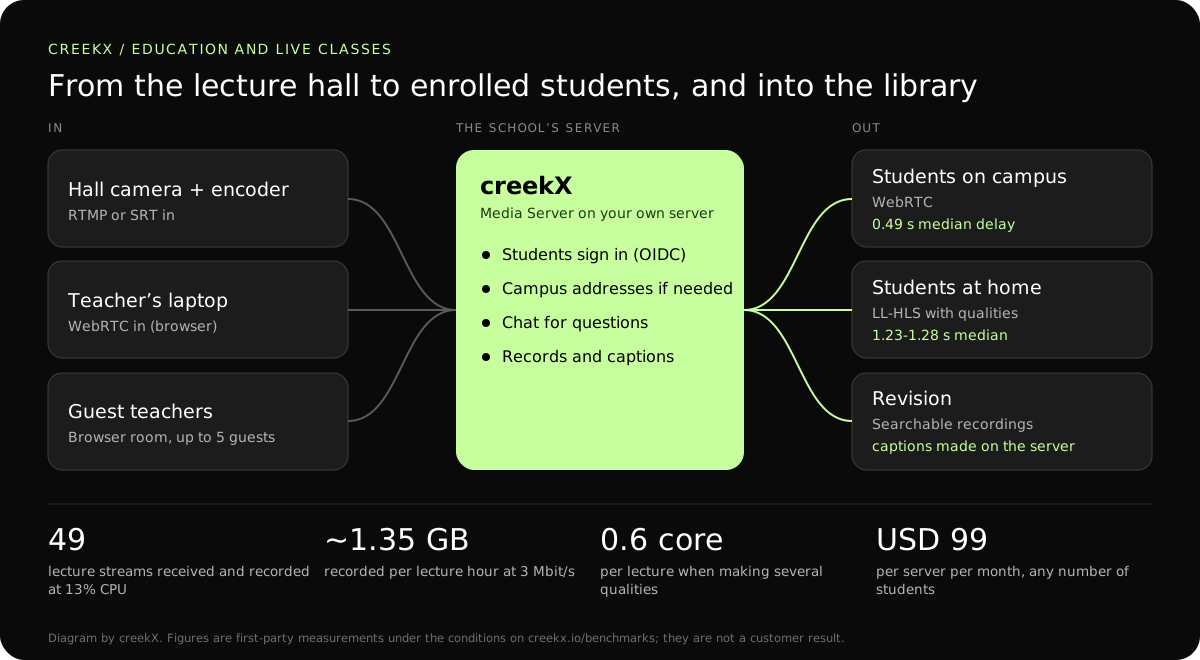
Diagram: a lecture hall encoder and guest teachers send a class to the school’s creekX server, which serves signed-in students on and off campus and keeps a searchable recording
The lecture path on the school’s own server. Delay figures: creekX 2026.10.13, 1080p source, measured on a local network. Conditions are on the benchmarks page.
03deliverables

What you get

  • OpenID Connect single sign-on, or private links per course
  • Guest teachers in a browser room, up to five
  • Recordings for revision on the school’s own disks
  • Captions and search made on your server (accuracy not yet measured)
  • Viewing limited to campus network addresses when required
  • Questions in chat, with moderation
04protocol fit

Which protocol for hall, student and replay

Protocol choices for a live class. Delay figures are creekX’s own measurements on a local network.
LegProtocolMeasured delayUse it when
Lecture hall encoder to serverRTMP on the campus networkNot measured separatelyHall and server share the campus network.
Teacher’s laptop to serverWebRTC from the browserNot measured separatelyNo encoder or software to install.
Server to students who ask questionsWebRTC0.49 s median, 0.68 s worstSeminars and small classes with live chat.
Server to large classes and home viewersLow-latency HLS1.23-1.28 s median, 1.40 s worstPlain HTTPS; several qualities for weak connections.
RevisionHLS from the libraryOn demandRecorded lectures with captions and search.
05sizing and cost

A sizing example: ten halls and 600 remote students

From our test on a 4 vCPU, 8 GB server with about 890 Mbit/s of upload: 49 incoming 1080p streams, each recorded, used 13% of the processor and 1.5 GB of memory.

  • In: ten halls at 3 Mbit/s is 30 Mbit/s into the server.
  • Out: 600 students at 3 Mbit/s is 1.8 Gbit/s, more than one 1 Gbit/s port. On the campus network that needs a faster port; over the internet it needs a lower bitrate (600 at 1.2 Mbit/s is 720 Mbit/s) or HLS behind a CDN.
  • Several qualities: about 0.6 of a core per class. Four classes with qualities is comfortable on 4 vCPU; ten needs a larger server, which we have not measured.
  • Storage: about 4.9 TB a term at 3 Mbit/s for 3,600 lecture hours.
  • Licence: Media Server Pro is USD 99 per server each month or USD 999 a year. No fee per student, per course or per hour watched.

Start with one course for a term, as the guide suggests, and measure what your own students actually use. The server sizing calculator turns those numbers into a server.

06First-party evidence

Measured delivery delay, with the test conditions

In a first-party test on 13 October 2026, CreekX 2026.10.13 measured a median delay of 0.49 seconds for WebRTC, with a worst result of 0.68 seconds. Low-latency HLS measured 1.23-1.28 seconds at the median and 1.40 seconds at worst. Standard HLS measured 3.4-3.8 seconds at the median and 4.4 seconds at worst. The test used the standard one-line installer on an Ubuntu 24.04 cloud server with 4 vCPU, 8 GB memory, a 100 GB NVMe disk and about 890 Mbit/s upload bandwidth. The source was a real 1080p, 25 fps H.264 clip at 5 Mbit/s, sent from OBS and viewed on a laptop over the local network. Each step ran for 60 seconds. These are product measurements under the stated conditions, not results from a customer deployment or a promise for each viewer.

07honest limits

What creekX does not do for education

  • It is not a learning platform: no courses, enrolment, attendance, quizzes or grades.
  • It is not a meeting tool: students do not join on camera, and browser rooms take five guests.
  • No SAML; sign-on is OpenID Connect only.
  • Caption accuracy is unmeasured.
  • No measured result on servers larger than 4 vCPU or for more than 50 streams on one installation.
08Scope & limitations

Know where the security and data boundary sits

CreekX has no telemetry and can run with an offline licence and offline installation package supplied through sales. Video and the installed product’s operational account data remain on the customer-controlled server during local operation. Website and sales enquiries are separate. Enabling an off-site backup, external storage, restream destination or another outbound integration creates a corresponding outbound data path. Recorded video and library files are not encrypted by CreekX on the customer’s disks; use server-level disk encryption when encryption at rest is required. Viewer-security features have been checked through CreekX automated tests, but no formal third-party security certification or assessment has been completed.

09buyer fit

Start with a trial or speak to CreekX first

Start the trial yourself

The 14-day Media Server trial is available without a credit card. It includes the Media Server feature set with trial limits of five 24/7 channels, five restream destinations per stream and 500 library videos. Installation requires an internet connection. Your content is kept when the trial ends. Add a paid licence to continue using licensed features and creating channels after the trial and any applicable licence grace period.

Speak to CreekX before installing

Contact CreekX first if the deployment must be fully offline or air-gapped, will use several servers or more than 50 concurrent live streams, expects thousands of viewers, forms part of a tender, or needs installation, training or Enterprise support. CreekX currently operates one server per installation, so the team should check hardware, network capacity and product fit for a large audience before the trial.

10faq

Questions from schools

Can students ask questions live?

Yes, in the stream’s chat. Over WebRTC the delay measured 0.49 seconds median in our tests, short enough for the lecturer to answer a question about the slide still on screen. Students do not appear on camera; this is a broadcast with chat, not a meeting.

Are lectures captioned?

Yes, made on your server with whisper.cpp, so no audio leaves it. Accuracy has not been measured yet and depends on the language and the hardware. Captions can be corrected line by line, or replaced with your own file.

Does CreekX replace our learning platform?

No. Link or embed streams from your learning platform. creekX has no courses, enrolment, assignments or grades. The REST API lets the learning platform create a stream per class and fetch its recording.

How many classes can run at once?

Up to 50 live streams per server on the Pro plan. Receiving and recording is cheap: 49 streams at once used 13% of a 4 vCPU server in our test. The limit is usually disk and the network, not the processor.

What about students on poor home internet?

Turn on several qualities for those classes, and HLS players step down to 720p, 480p or 360p. It costs about 0.6 of a core per class, so use it where needed. Steps: adaptive bitrate streaming.

How much storage does a term need?

A lecture at 3 Mbit/s is about 1.35 GB an hour (calculated). Ten halls, six hours a day, five days a week for twelve weeks is 3,600 hours, about 4.9 TB.

Can lectures stay on campus only?

Yes. Add the campus address ranges under Who may watch, and the watch page and player work only from there. Steps: who may watch and stream.

11Your next step

Start with one course

Run one course through the trial for a term before rolling it out.

Follow the build