
Viewers watch on someone else’s site
Embed the live player on your own pages. The player and the video come from your server, so the reader stays on the article, beside your own advertising and subscription prompts.
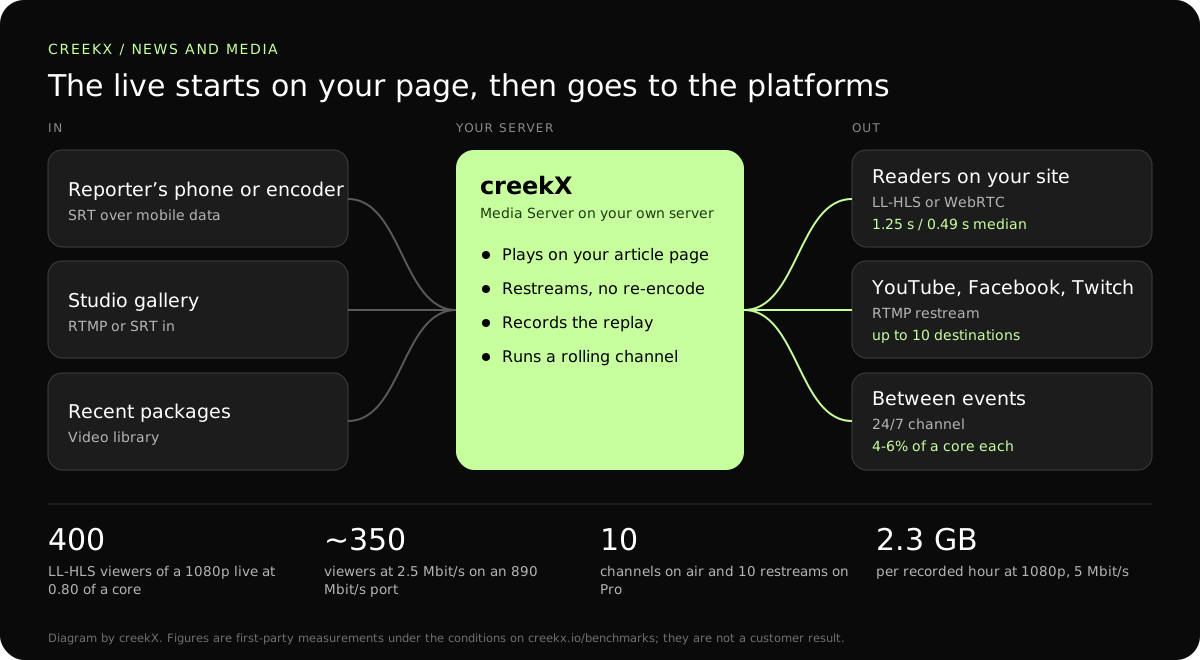
Publishers want their live coverage on their own pages, where the audience and the ads are theirs. CreekX plays it on your site, sends it to social platforms at the same time and keeps a 24/7 channel running between events.
A publisher’s best live moments are a verdict, a result, a storm. When the live sits only on a social platform, the readers, the comments, the replay and the advertising around it sit there too, and the article page carries an embed that sends people away.
Embed the live player on your own pages. The player and the video come from your server, so the reader stays on the article, beside your own advertising and subscription prompts.
Restream to several platforms at once. creekX copies the same live to YouTube, Facebook or any RTMP or SRT destination without re-encoding, up to 10 per stream on the Pro plan.
Run a 24/7 channel from your video library, so a “watch live” page is never empty. A live can take the channel over when news breaks. Each channel used 4 to 6% of a core in our tests.
From reporters’ encoders over SRT, or from the studio. SRT re-sends lost packets, which is what a crowded mobile network outside a courthouse needs. Give a freelancer a guest key that expires instead of your own stream key.
Your site plus platforms at once. Tick the platforms on the stream before going live; each shows whether it is receiving. Steps: YouTube, Facebook and more at once.
Recordings go to the library and into 24/7 channels. The replay is ready when the live ends, on your own disks, with captions made on your server.
| Leg | Protocol | Measured delay | Why |
|---|---|---|---|
| Reporter to server on mobile data | SRT with AES | The SRT latency you set | Re-sends lost packets; encrypted in transit. |
| Studio gallery to server | RTMP or SRT | Not measured separately | A steady wired line. |
| Server to readers on the article | Low-latency HLS | 1.23-1.28 s median, 1.40 s worst | HTTPS in every browser, and cacheable by a CDN. |
| Server to a live blog or results desk | WebRTC | 0.49 s median, 0.68 s worst | When the video must match live text or data. |
| Server to social platforms | RTMP restream | The platform’s own delay | Reach, without a second encoder. |
From our tests on a 4 vCPU, 8 GB server: 400 low-latency HLS viewers of a 1080p stream used 0.80 of a core; a 24/7 channel used 4 to 6% of a core in development.
A cost comparison is worked through in self-hosted and cloud streaming cost.
In a first-party test on 13 October 2026, CreekX 2026.10.13 measured a median delay of 0.49 seconds for WebRTC, with a worst result of 0.68 seconds. Low-latency HLS measured 1.23-1.28 seconds at the median and 1.40 seconds at worst. Standard HLS measured 3.4-3.8 seconds at the median and 4.4 seconds at worst. The test used the standard one-line installer on an Ubuntu 24.04 cloud server with 4 vCPU, 8 GB memory, a 100 GB NVMe disk and about 890 Mbit/s upload bandwidth. The source was a real 1080p, 25 fps H.264 clip at 5 Mbit/s, sent from OBS and viewed on a laptop over the local network. Each step ran for 60 seconds. These are product measurements under the stated conditions, not results from a customer deployment or a promise for each viewer.
CreekX has no telemetry and can run with an offline licence and offline installation package supplied through sales. Video and the installed product’s operational account data remain on the customer-controlled server during local operation. Website and sales enquiries are separate. Enabling an off-site backup, external storage, restream destination or another outbound integration creates a corresponding outbound data path. Recorded video and library files are not encrypted by CreekX on the customer’s disks; use server-level disk encryption when encryption at rest is required. Viewer-security features have been checked through CreekX automated tests, but no formal third-party security certification or assessment has been completed.
The 14-day Media Server trial is available without a credit card. It includes the Media Server feature set with trial limits of five 24/7 channels, five restream destinations per stream and 500 library videos. Installation requires an internet connection. Your content is kept when the trial ends. Add a paid licence to continue using licensed features and creating channels after the trial and any applicable licence grace period.
Contact CreekX first if the deployment must be fully offline or air-gapped, will use several servers or more than 50 concurrent live streams, expects thousands of viewers, forms part of a tender, or needs installation, training or Enterprise support. CreekX currently operates one server per installation, so the team should check hardware, network capacity and product fit for a large audience before the trial.
No. Produce the show in your own tools, then send it to CreekX. Lower thirds, tickers and switching belong in the gallery or in OBS.
No. Protect access with private links, tokens and your own approval check, which lets your subscriber system decide who plays a stream. There is no built-in paywall and no ad insertion; advertising on your page and in your own player is yours to run.
Yes, with SRT from an encoder or phone app, or RTMP where SRT is not available. Plan for upload of about twice the stream’s bitrate. Background: SRT, RTMP and WHIP compared.
Up to its network port. A 4 vCPU server delivered a 1080p live to 400 low-latency HLS viewers at 0.80 of a core, so the processor has room, but 890 Mbit/s of upload is about 350 viewers at 2.5 Mbit/s. A news site should plan on HLS behind a CDN from the start: HLS through a CDN. We have not published a measured CDN result.
Yes. The REST API creates streams and returns their watch details, and signed webhooks tell your systems when a stream goes live or ends and when a recording is ready. Start with the API quick start.
The recording is prepared when the live ends and appears in the video library; long lives may be split into parts. Check it plays before linking it from the article.
Yes. Build a 24/7 channel from library videos; the schedule refills itself so it does not run dry. How it works: 24/7 playout from a library.
Run one programme through the trial, then plan the rest with CreekX.