
Several stages at once
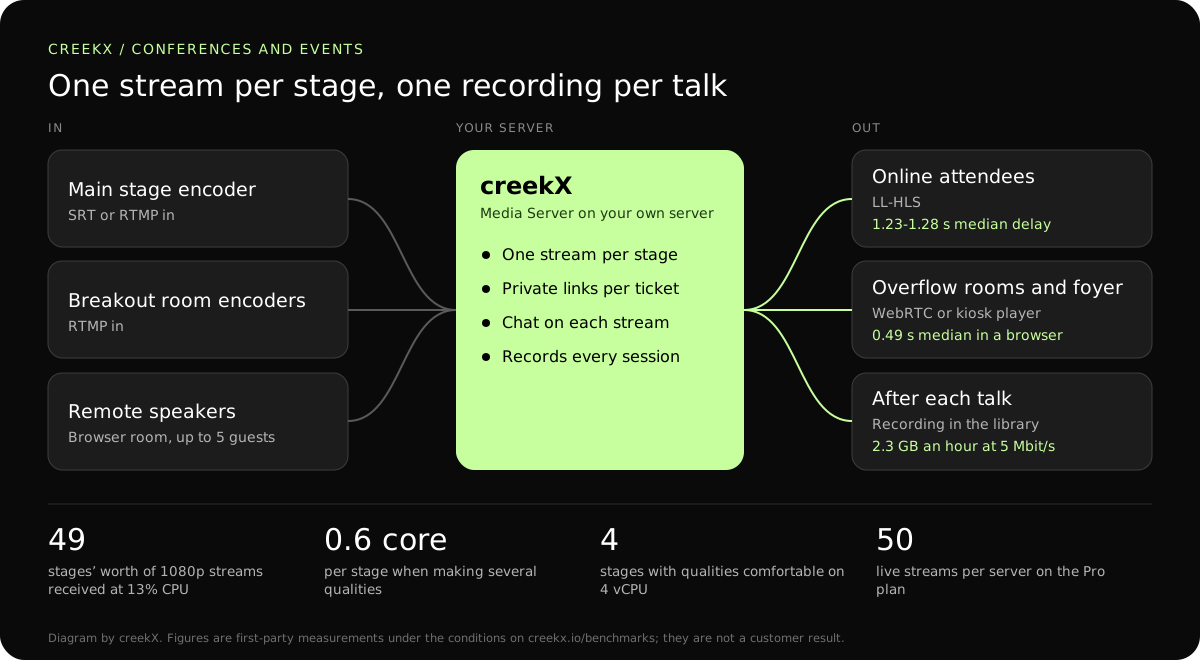
One stream per room, each with its own page, chat and recording. Receiving streams is the cheap part: in our test a 4 vCPU server took in 49 at once at 13% of its processor.
A conference runs several rooms at once, with speakers who cannot travel. CreekX streams each stage, brings remote speakers in as guests and turns every session into a recording for attendees.
A one-room event is a single stream. A conference is a different problem: six rooms running at once, each needing its own page and its own recording, a keynote speaker who cannot travel, and a ticket price that only means something if the stream is not open to everyone with the link.
One stream per room, each with its own page, chat and recording. Receiving streams is the cheap part: in our test a 4 vCPU server took in 49 at once at 13% of its processor.
Bring them in as live guests. A room opened in the browser takes up to five guests with their cameras; your browser mixes the picture and sends it live to the stage’s stream. Speakers need only a link and headphones.
Private links for ticket holders; sell tickets in your own system. Issue an expiring link or a one-time token per ticket, or have your ticketing system approve each viewer before playback.
OBS or a hardware encoder sending SRT or RTMP. Give each room its own stream and key, and use a guest key that expires for a room run by an outside crew. Steps: go live from an encoder.
Private links that expire, for example at the end of the event or after 30 days of replay. One action revokes every private link if one leaks. The connection log shows how many tickets actually watched.
Recordings into the library after each talk. Turn on Record every live for each stage; a session appears in Videos when its encoder stops. Long sessions may be split into parts.
| Leg | Protocol | Measured delay | Use it when |
|---|---|---|---|
| Stage encoder to server | SRT, or RTMP on a good wired line | Not measured separately | The venue line is shared or the server is in a data centre. |
| Remote speaker to stage | WebRTC browser room | Conversational | Up to five guests, mixed in the host’s browser. |
| Server to online attendees | Low-latency HLS | 1.23-1.28 s median, 1.40 s worst | Plain HTTPS on any device; several qualities possible. |
| Server to Q&A participants | WebRTC | 0.49 s median, 0.68 s worst | Questions in chat must match what the speaker just said. |
| Session replays | HLS from the library | On demand | After the talk, with captions. |
From our test on a 4 vCPU, 8 GB server with about 890 Mbit/s of upload: 49 incoming 1080p streams used 13% of the processor; several qualities cost about 0.6 of a core per stream.
The server can sit in a data centre rather than at the venue; then the venue only needs upload for the encoders. Put your own numbers into the server sizing calculator.
In a first-party test on 13 October 2026, CreekX 2026.10.13 measured a median delay of 0.49 seconds for WebRTC, with a worst result of 0.68 seconds. Low-latency HLS measured 1.23-1.28 seconds at the median and 1.40 seconds at worst. Standard HLS measured 3.4-3.8 seconds at the median and 4.4 seconds at worst. The test used the standard one-line installer on an Ubuntu 24.04 cloud server with 4 vCPU, 8 GB memory, a 100 GB NVMe disk and about 890 Mbit/s upload bandwidth. The source was a real 1080p, 25 fps H.264 clip at 5 Mbit/s, sent from OBS and viewed on a laptop over the local network. Each step ran for 60 seconds. These are product measurements under the stated conditions, not results from a customer deployment or a promise for each viewer.
CreekX has no telemetry and can run with an offline licence and offline installation package supplied through sales. Video and the installed product’s operational account data remain on the customer-controlled server during local operation. Website and sales enquiries are separate. Enabling an off-site backup, external storage, restream destination or another outbound integration creates a corresponding outbound data path. Recorded video and library files are not encrypted by CreekX on the customer’s disks; use server-level disk encryption when encryption at rest is required. Viewer-security features have been checked through CreekX automated tests, but no formal third-party security certification or assessment has been completed.
The 14-day Media Server trial is available without a credit card. It includes the Media Server feature set with trial limits of five 24/7 channels, five restream destinations per stream and 500 library videos. Installation requires an internet connection. Your content is kept when the trial ends. Add a paid licence to continue using licensed features and creating channels after the trial and any applicable licence grace period.
Contact CreekX first if the deployment must be fully offline or air-gapped, will use several servers or more than 50 concurrent live streams, expects thousands of viewers, forms part of a tender, or needs installation, training or Enterprise support. CreekX currently operates one server per installation, so the team should check hardware, network capacity and product fit for a large audience before the trial.
No. Sell in your ticketing system and send buyers a private watch link. creekX has no checkout, no attendee list and no paywall. The link between the two is the API: your system can create links and approve viewers.
Passing streams through is cheap; making extra qualities costs about 0.6 of a core per stream. In our tests a 4 vCPU server received 49 streams at 13% CPU, and made several qualities for four streams comfortably, with six too many. Size it with your stage count and whether attendees need lower qualities.
Yes, as live guests, with a camera, a microphone and a current browser. This needs creekX at an https address. Steps: live with guests.
About twice the total of the stage bitrates. Six stages at 2.5 Mbit/s is 15 Mbit/s of video, so plan for 30 Mbit/s of steady, wired upload reserved for the encoders, separate from the attendee Wi-Fi. How much upload speed live streaming needs explains the rule.
A recording is prepared when the stage’s encoder stops and then appears in the library. Check each one plays before publishing the agenda links.
Yes. Open the stage’s watch link on a screen, or lock an Android screen to it with the kiosk player, described under kiosks and signage.
Every stage at once for an hour, with the real encoders on the real venue line, a remote speaker in a room, and a ticket link opened on a phone on mobile data. The event rehearsal checklist lists the rest.
Run every stage at once on a test server before the event.