
The camera falls over under viewers
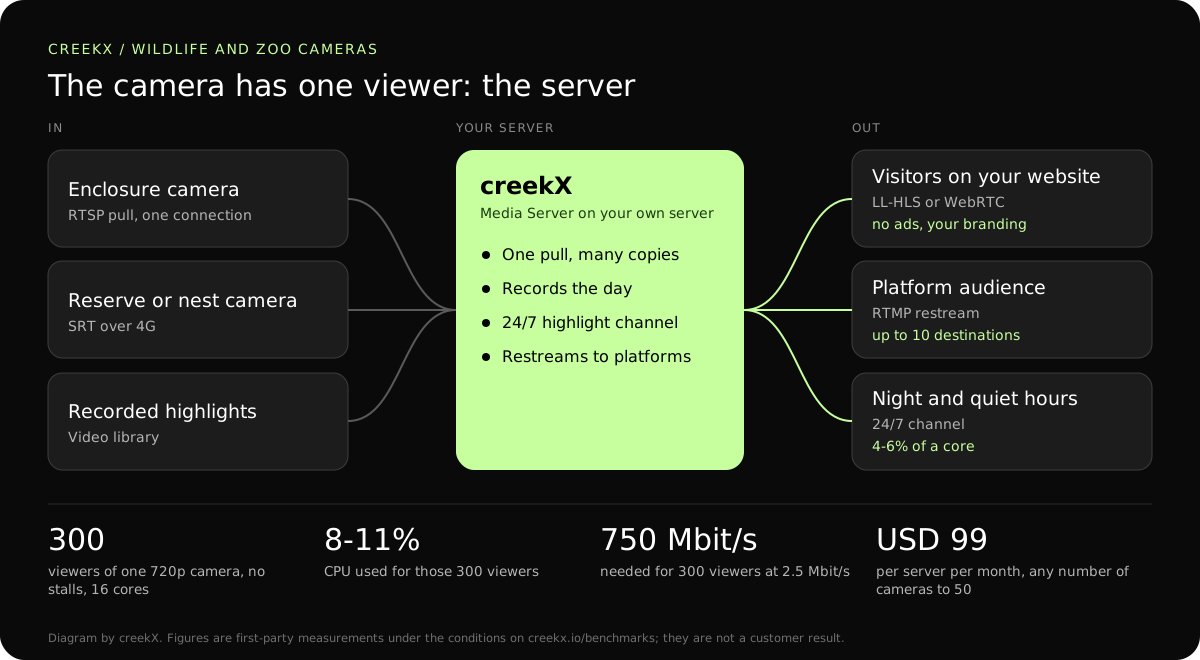
The server pulls the camera once; viewers connect to the server. The camera carries one connection however many people watch, and its address and password never appear on your web page.
A popular animal camera can bring hundreds of people to the same page at once, and an IP camera cannot serve them. CreekX pulls each camera once and serves every viewer, with no ads and no camera cloud.
An IP camera is built to feed one recorder and a couple of keepers. Most allow a handful of connections at once. When a hatching or a birth is shared by the local news, a few hundred visitors open the page and the camera stops answering for everyone, including the keepers.
The server pulls the camera once; viewers connect to the server. The camera carries one connection however many people watch, and its address and password never appear on your web page.
Embed the player on your own site, under your own branding and beside your own donation or ticket button. creekX shows no ads and adds no suggested videos.
Bring cameras in over SRT from reserves and enclosures beyond the main network. SRT re-sends lost packets inside a delay you choose, which is what a camera on a 4G link in a field needs.
Pulling a camera by its address is part of Media Server, so this works in the 14-day trial. The longer walk-through is in the wildlife and zoo live cameras guide.
RTSP on your network, or SRT from a remote site. Paste the camera’s RTSP address into a stream and creekX fetches it, and reconnects by itself if the camera restarts. Steps: IP cameras.
WebRTC or low-latency HLS to browsers and phones. For a camera nobody needs to react to, low-latency HLS is the sensible default: it is plain HTTPS and can sit behind a CDN on a busy day.
Play highlights as a 24/7 channel when the animals sleep. Record the camera through the day, pick the best clips, and the channel fills the night with them. A channel used 4 to 6% of a core in our tests.
To put the picture on your own page, see putting an IP camera on a website without a cloud subscription.
| Leg | Protocol | Measured figure | Why |
|---|---|---|---|
| Enclosure camera to server | RTSP pull | One connection per camera | The camera stays on the zoo network. |
| Remote reserve to server | SRT | Delay is the SRT latency you set | Copes with packet loss on 4G or a radio link. |
| Server to website visitors | Low-latency HLS | 1.23-1.28 s median | Plain HTTPS in any browser; a CDN can carry busy days. |
| Server to a keeper or vet | WebRTC | 0.49 s median, 0.68 s worst | When someone is acting on what they see. |
| Server to a video platform | RTMP restream | Copied without re-encoding | Reach beyond your own site. |
From our tests: a 16-core server served 300 viewers of one 720p stream at about 8 to 11% CPU, and a 4 vCPU server sustained about 890 Mbit/s of upload.
The traffic is the real cost. 750 Mbit/s for an hour is about 340 GB, so ask your provider what a busy month costs before the chick hatches.
In a first-party test on 13 October 2026, CreekX 2026.10.13 measured a median delay of 0.49 seconds for WebRTC, with a worst result of 0.68 seconds. Low-latency HLS measured 1.23-1.28 seconds at the median and 1.40 seconds at worst. Standard HLS measured 3.4-3.8 seconds at the median and 4.4 seconds at worst. The test used the standard one-line installer on an Ubuntu 24.04 cloud server with 4 vCPU, 8 GB memory, a 100 GB NVMe disk and about 890 Mbit/s upload bandwidth. The source was a real 1080p, 25 fps H.264 clip at 5 Mbit/s, sent from OBS and viewed on a laptop over the local network. Each step ran for 60 seconds. These are product measurements under the stated conditions, not results from a customer deployment or a promise for each viewer.
CreekX has no telemetry and can run with an offline licence and offline installation package supplied through sales. Video and the installed product’s operational account data remain on the customer-controlled server during local operation. Website and sales enquiries are separate. Enabling an off-site backup, external storage, restream destination or another outbound integration creates a corresponding outbound data path. Recorded video and library files are not encrypted by CreekX on the customer’s disks; use server-level disk encryption when encryption at rest is required. Viewer-security features have been checked through CreekX automated tests, but no formal third-party security certification or assessment has been completed.
The 14-day Media Server trial is available without a credit card. It includes the Media Server feature set with trial limits of five 24/7 channels, five restream destinations per stream and 500 library videos. Installation requires an internet connection. Your content is kept when the trial ends. Add a paid licence to continue using licensed features and creating channels after the trial and any applicable licence grace period.
Contact CreekX first if the deployment must be fully offline or air-gapped, will use several servers or more than 50 concurrent live streams, expects thousands of viewers, forms part of a tender, or needs installation, training or Enterprise support. CreekX currently operates one server per installation, so the team should check hardware, network capacity and product fit for a large audience before the trial.
In our test a 16-core server held 300 viewers of one 720p stream at 2.5 Mbit/s with no stalls, at 10.6% CPU over WebRTC and 8.0% over low-latency HLS. The internet connection usually sets the real limit: 300 viewers at 2.5 Mbit/s is 750 Mbit/s. The test and its limits are in how many viewers one IP camera can serve.
No. The camera has one connection, to the server. A thousand visitors and one visitor look the same to it.
Yes. Run a 24/7 channel of recorded highlights, and point the page at the channel overnight. Steps: put a video library on air.
Usually not. Showing cameras to the public is a Media Server job: pull each camera by its RTSP or SRT address and publish it. CreekX Cameras adds a keepers’ wall, a recording timeline and per-site permissions, and is licensed per camera.
H.264 video, a keyframe every one or two seconds, and a fixed bitrate you have chosen for your upload: 2.5 Mbit/s at 720p is a reasonable start. We have not measured H.265 cameras; set the camera to H.264 where it offers the choice.
Yes, by sending SRT at a bitrate the link can hold, for example 1 Mbit/s at 480p. A stream that runs all day at 1 Mbit/s uses about 10.8 GB of mobile data a day, so check the data plan. Background: SRT over bad networks.
Yes. creekX copies the stream to YouTube, Facebook or any RTMP or SRT destination without re-encoding. Steps: YouTube, Facebook and more at once.
Try the trial with one camera on a test page, then add the rest.