Feeds are spread across sites or applications
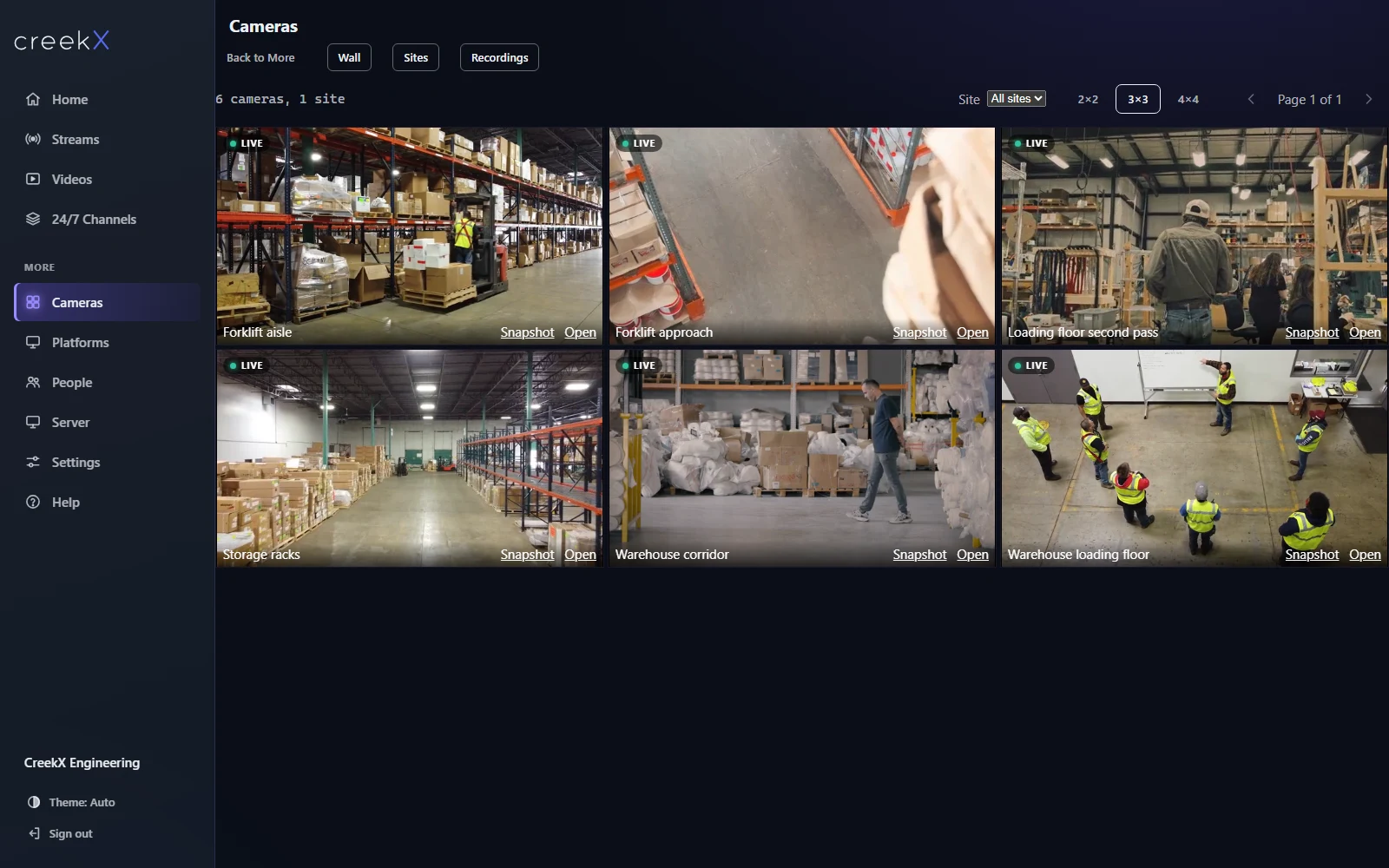
Bring supported camera streams into one live wall instead of switching between separate viewers.
CreekX Cameras brings supported ONVIF and RTSP feeds into one browser-based camera wall. Your team can watch live video, record footage, review playback and control access without sending the system to a hosted video platform. CreekX Cameras is licensed separately per camera and begins with an assisted compatibility check using your camera models.
CreekX Cameras is intended for organisations that need a shared view of camera feeds while retaining control of the server and recordings.
Bring supported camera streams into one live wall instead of switching between separate viewers.
Run the software and store recordings on your own server, including fully offline deployments arranged through CreekX.
Provide authorised viewers with live feeds in a browser while controlling which camera sites each person can see.
Use ONVIF discovery to find devices on the network, connect ONVIF or RTSP feeds and use PTZ controls where the camera connection provides them.
Arrange live feeds on the camera wall and open them from supported browsers, phones or locked Android kiosk displays.
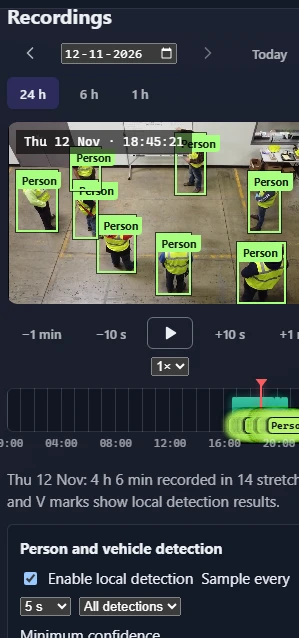
Record continuously to your own disks, review the playback timeline and create clips or snapshots when a specific moment needs to be retained.
Assign people to the camera sites they are permitted to view. Viewer and administrative activity logs remain on your server.
Monitor camera status and configure alerts so your team can investigate an interrupted feed.
CreekX Cameras uses an assisted evaluation route, separate from the Media Server free trial.
Tell CreekX how many cameras and sites you have, what viewers need to see, whether recording is required and whether the installation must work offline. If you do not know the technical details yet, describe the viewing or recording problem and say which details are not known.
Share camera brands and models if known, together with ONVIF or RTSP details. Physical-camera validation remains outstanding, so compatibility should be confirmed with your equipment during the pilot.
Server requirements depend on camera count, video quality, recording retention, storage performance and network capacity. CreekX sizes the proposed setup from those conditions rather than promising one fixed camera count.
CreekX supports ONVIF and RTSP camera connections. Cameras that depend only on the newer ONVIF Media2 profile are not yet supported; that work is in progress, with no confirmed completion date. The documented self-install path uses Ubuntu. A fully offline installer and offline licence file are supplied through CreekX for offline or air-gapped deployments.
On 13 October 2026, CreekX 2026.10.13 was installed using the standard one-line installer on Ubuntu 24.04. The test server had 4 vCPU, 8 GB memory, a 100 GB NVMe disk and about 890 Mbit/s upload bandwidth. It received a real 1080p, 25 fps H.264 test clip at 5 Mbit/s, and each test step ran for 60 seconds.
All 49 streams remained live. CreekX reported 13% CPU across the four cores, 1.5 GB memory use and 30.6 MB/s of disk writes. The CPU figures exclude the test tools.
The inputs were not validated physical cameras. The test therefore measures concurrent recorded streams under the stated conditions, not broad camera compatibility or a fixed number of cameras for another server.
At the tested 5 Mbit/s rate, one 1080p stream produces about 2.3 GB per hour, or about 55 GB per day. Retention requirements and disk performance should be included when sizing a deployment.
CreekX reports HTTPS for the application and video, encrypted WebRTC media, encrypted SRT ingest and AES-256-GCM protection for stored credentials. Recorded video is not encrypted by CreekX on the customer’s disks; deployments requiring encryption at rest need server-level disk encryption. Optional off-site backups, storage services or other outbound integrations create data paths outside the server when the customer enables them. CreekX currently has no formal security certification, independent penetration test or external audit.
CreekX Cameras is a per-camera subscription. Licence pricing is not metered by viewer count or hosted storage usage, although the capacity of your server, disks and network still sets practical limits.
Up to 16 cameras at $60 per camera per year.
From 17 to 100 cameras at $40 per camera per year.
Deployments with more than 100 cameras or multiple servers are priced by quote.
Software use for the paid period, the live wall, ONVIF discovery and PTZ, recording, playback, clips, snapshots, camera-offline alerts, per-site access, releases issued during the subscription, offline upgrade packages, the Ubuntu self-install kit and email support.
Updates and email support end, but existing camera recording continues and recordings remain playable. After a 30-day grace period, new cameras and newly enabled features are restricted until renewal. Data already stored on the server is not deleted.
CreekX Cameras is intended for mid-sized and large organisations with a technical owner and a need to view or record camera feeds on customer-controlled infrastructure.
CreekX Cameras is not currently suitable when procurement requires confirmed support for Media2-only cameras, a current formal security certification, an independent penetration test, built-in SAML or a round-the-clock phone-support commitment. Requirements for done-for-you installation, operator training, several servers or extended support should be discussed as an Enterprise engagement.
Share your camera count, sites, recording needs and model details if known. If those details are not available yet, describe what your team needs to watch, retain or share. CreekX can use that information to plan a compatibility check and assisted pilot. Paid Cameras support is available Sunday to Thursday, 09:00-18:00 Gulf Standard Time, with a reply within one business day.
CreekX Cameras
ONVIF and RTSP cameras, recorded on your own server, with motion events and playback.
CreekX CamerasAvailable in beta
People and vehicles found by a model that runs on your server, not in a cloud. Search by camera, time and type, see detections on the timeline, and draw zones that matter.
Request the betaSee people and vehicle detections, timeline marks and named zones in the beta workspace.
Open the detection workspace at full sizeRuns on your server, off until you switch it on. Nothing is sent to a cloud.