
Different vendors, different apps
Pull any ONVIF or RTSP camera into one view, whoever supplied it. The camera keeps working with its original system; creekX opens its own connection to it.
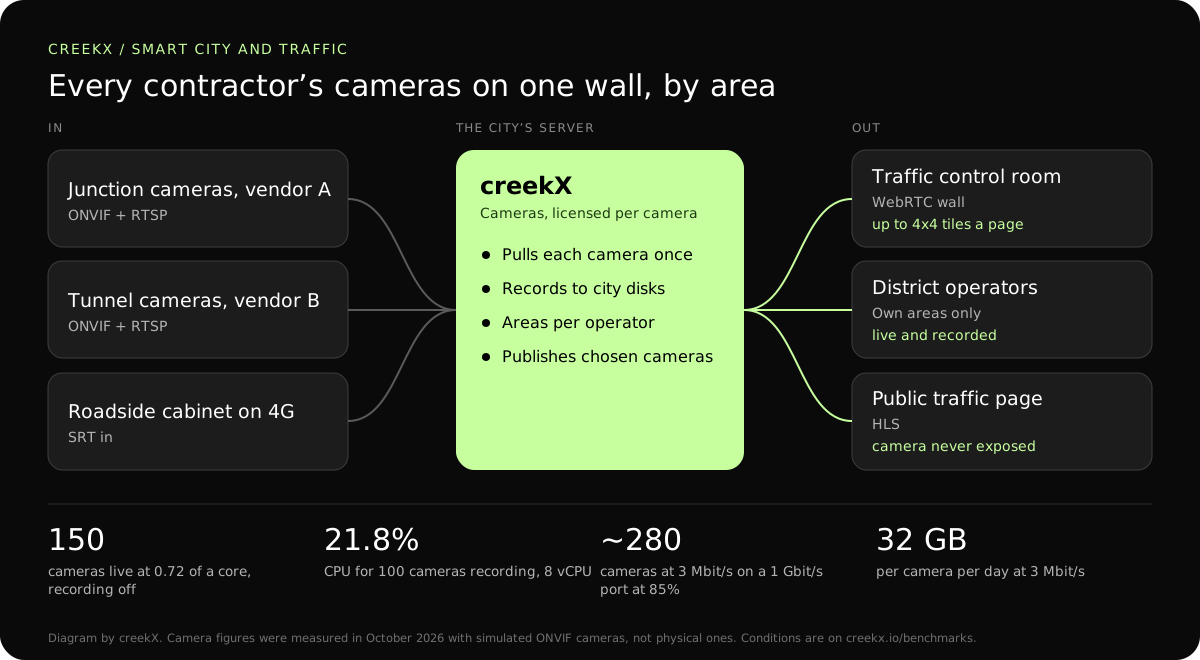
Cities collect cameras from many contractors and systems. CreekX Cameras brings ONVIF and RTSP cameras onto one wall grouped by area, records them and can share chosen cameras publicly.
A city’s cameras arrive one contract at a time: junctions from one supplier, tunnels from another, a parks project with its own app. Ten years later the traffic room has five viewers on five screens, and the road authority cannot show a journalist a camera without giving out a camera’s address.
Pull any ONVIF or RTSP camera into one view, whoever supplied it. The camera keeps working with its original system; creekX opens its own connection to it.
Limit each operator to named areas. A district operator sees only that district’s cameras, live and recorded, and the server enforces it.
Publish chosen cameras on the city’s website without exposing the camera itself. The server pulls the camera once and serves the public from its own address, so the camera’s address, login and network stay private.

The steps below repeat per area. The longer walk-through is in the city traffic camera streaming guide.
Discover ONVIF cameras or add RTSP addresses, grouped by area. Passwords are stored sealed with AES-256-GCM. Cameras on a roadside mobile link can send SRT instead.
A wall of up to 4x4 tiles per page, with continuous recording and playback by time. A camera that stops answering raises a camera-offline alert, which is how a failed roadside link is noticed.
Stream a camera to the public site through the server, never directly. Turn on that camera’s watch link, embed the player on the traffic page, and turn it off again when a camera should go dark.
To put a single camera on a web page without the wall, Media Server alone is enough: RTSP to WebRTC explains the conversion.
| Leg | Protocol | Figure | Notes |
|---|---|---|---|
| Camera to server on the city network | RTSP video, ONVIF control | 3 Mbit/s per 1080p camera in our test | The camera never faces the internet. |
| Roadside cabinet on 4G | SRT with an AES passphrase | Not measured separately | Re-sends lost packets and encrypts the feed. |
| Server to the control room wall | WebRTC | 0.49 s median, 0.68 s worst | Operators see an incident as it happens. |
| Server to district offices | Low-latency HLS | 1.23-1.28 s median | Plain HTTPS across municipal firewalls. |
| Server to the public traffic page | HLS | 3.4-3.8 s median | Any browser; can sit behind a CDN. |
Camera servers are sized by network and disk first. In our test on 15 October 2026 an 8 vCPU, 16 GB server recorded 100 simulated ONVIF cameras at 1080p and 3 Mbit/s at 21.8% CPU.
Not measured: physical cameras, H.265, 200 cameras on one server, and viewers and recording under load together.
On 13 October 2026, CreekX 2026.10.13 was installed using the standard one-line installer on Ubuntu 24.04. The test server had 4 vCPU, 8 GB memory, a 100 GB NVMe disk and about 890 Mbit/s upload bandwidth. It received a real 1080p, 25 fps H.264 test clip at 5 Mbit/s, and each test step ran for 60 seconds.
All 49 streams remained live. CreekX reported 13% CPU across the four cores, 1.5 GB memory use and 30.6 MB/s of disk writes. The CPU figures exclude the test tools.
The inputs were not validated physical cameras. The test therefore measures concurrent recorded streams under the stated conditions, not broad camera compatibility or a fixed number of cameras for another server.
At the tested 5 Mbit/s rate, one 1080p stream produces about 2.3 GB per hour, or about 55 GB per day. Retention requirements and disk performance should be included when sizing a deployment.
CreekX reports HTTPS for the application and video, encrypted WebRTC media, encrypted SRT ingest and AES-256-GCM protection for stored credentials. Recorded video is not encrypted by CreekX on the customer’s disks; deployments requiring encryption at rest need server-level disk encryption. Optional off-site backups, storage services or other outbound integrations create data paths outside the server when the customer enables them. CreekX currently has no formal security certification, independent penetration test or external audit.
CreekX Cameras is intended for mid-sized and large organisations with a technical owner and a need to view or record camera feeds on customer-controlled infrastructure.
No. The current release shows and records video. It does not analyse it: no vehicle counts, no number-plate reading, no incident detection. Analytics can read the same camera in parallel from their own system.
Yes. The server pulls the camera once and serves viewers, so the camera never faces the internet. In our test a 16-core server served 300 viewers of one 720p stream with no stalls at about 8 to 11% CPU; the internet connection is the real limit. Background: how many viewers one IP camera can serve.
In one test a server held 150 cameras using 0.72 of a core with recording off. With recording on, an 8 vCPU server held 100 simulated 1080p cameras at 21.8% CPU. The network port and the disks fill first: a 1 Gbit/s port carries about 280 cameras at 3 Mbit/s. Size it with CreekX.
Whatever its stream is set to, all day: 3 Mbit/s for a typical 1080p stream, less for the camera’s smaller second stream. On mobile data, send the smaller stream to the centre and keep the full one for a local recorder if you have one.
As long as the disks allow. At 3 Mbit/s a camera writes about 32 GB a day, so 200 cameras need about 6.4 TB for each day kept. Retention is set by your policy and your storage budget, not by the licence.
Yes, with an offline licence and installation package supplied through sales. A public traffic page then needs its own path out, which the city provides.
Tell us how many cameras, which vendors and which areas, and CreekX will size the servers and say plainly what is not supported.