Healthcare Training Video

Private live video for healthcare training and demonstrations

Teaching hospitals and medical device teams stream demonstrations to trainees and partners. CreekX keeps the video on your own servers, limits who can watch and records sessions for later teaching.

01triggers

When training video must stay private

A demonstration is only useful live if the people watching can ask a question while the step is still on screen. It is only permitted if the video stays where the institution’s rules say it must. Public video platforms fail the second test, and a video-meeting tool pointed at a monitor fails the first on picture quality.

Sessions are for named people only

Use private links that expire for invited guests and single sign-on for staff, so the audience is the list you approved. Limit watching to the hospital’s own network addresses when a session must not leave the building.

Presenters join from elsewhere

Bring remote presenters in as live guests. A room opened in the browser takes up to five guests with their cameras; your browser mixes the picture and sends it live, and guests need only a link.

Sessions are reused for teaching

Record sessions and publish them to a private library. Captions are made on your own server with no audio leaving it, and every spoken word becomes searchable. Caption accuracy has not been measured, so check medical terms before publishing.

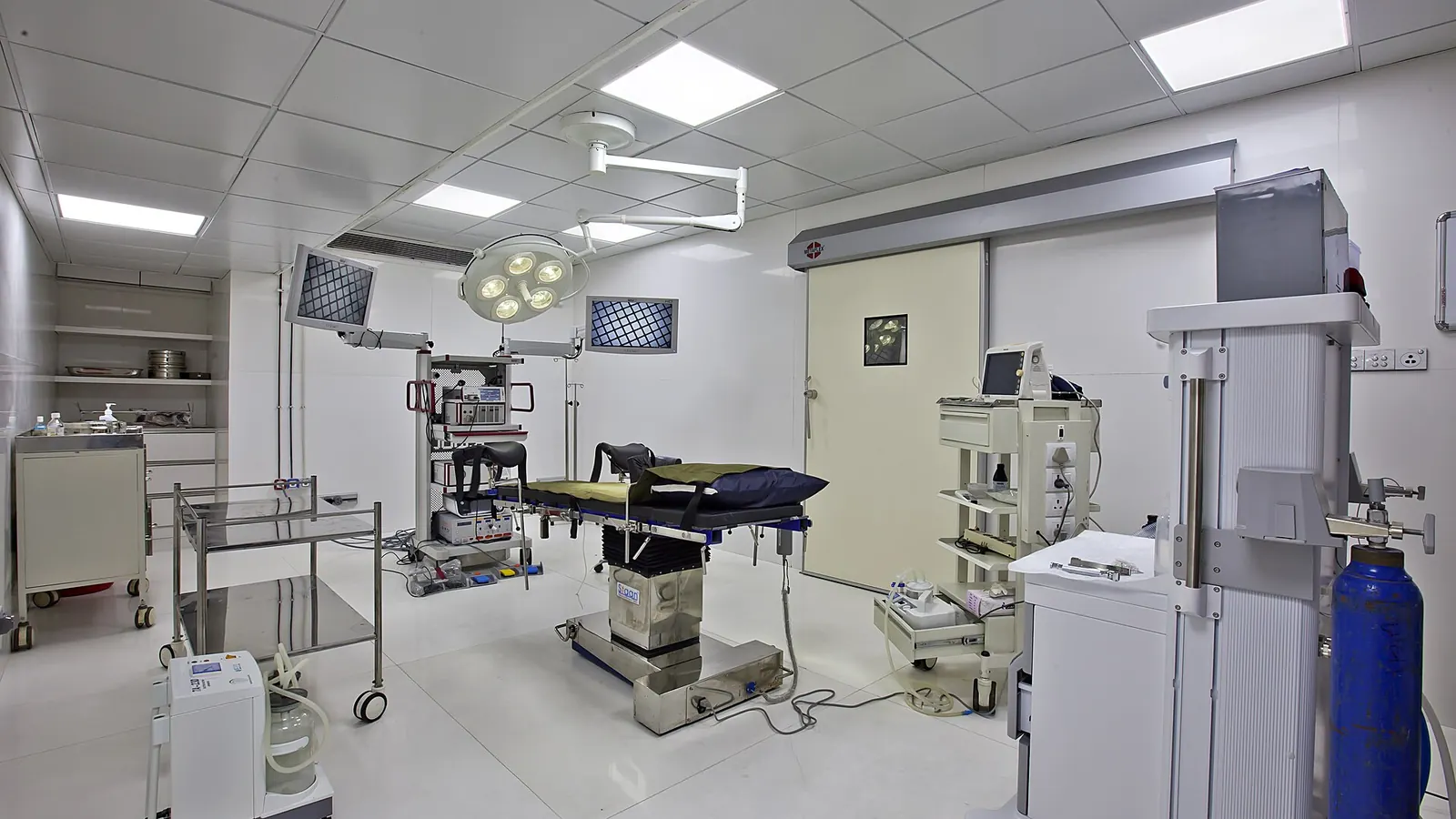
An empty laparoscopic operating theatre with surgical lights, monitors and an operating table
A theatre already has cameras and monitors. Teaching from it means carrying one of those pictures to another room without it leaving the hospital.
02process

How it works

A session has three steps. The longer walk-through is in the medical training live video guide.

Send the session

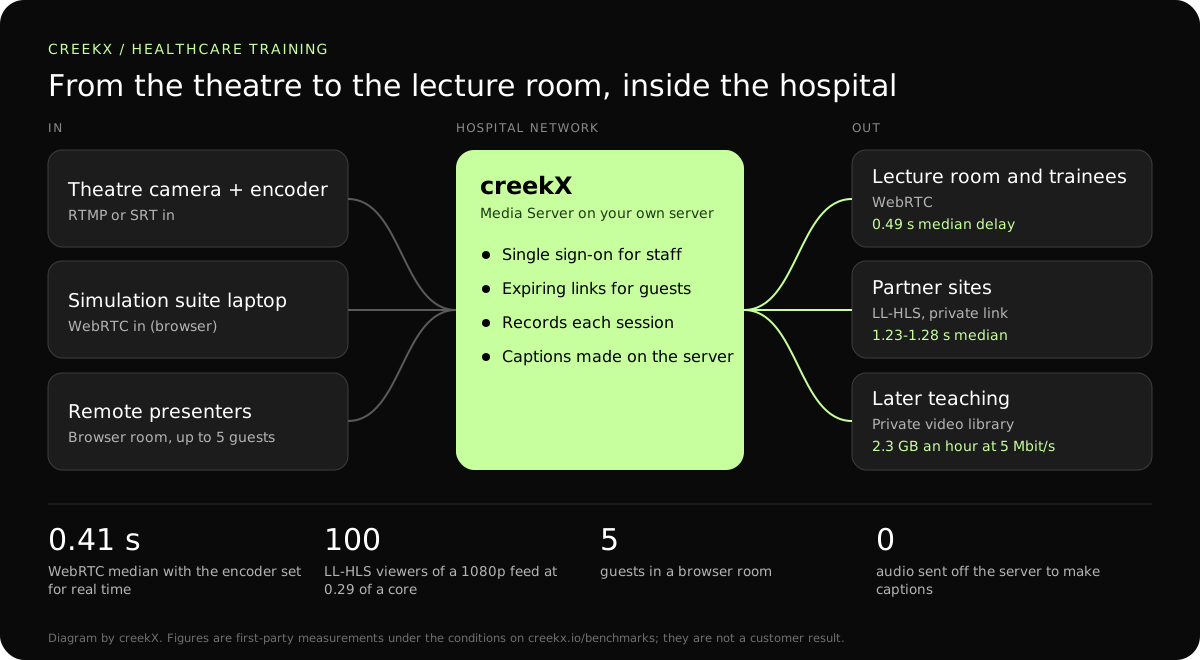
From an encoder, a camera or a browser. A theatre camera or endoscopy output usually goes through a hardware encoder sending RTMP or SRT; a seminar room can go live from a laptop browser with no software.

Limit the audience

Private links, sign-on and network limits. Each viewer connection is logged with its address, device and time, and all private links can be revoked at once when the session ends.

Keep the recording

Recordings stay on your own disks, about 2.3 GB an hour at 5 Mbit/s. creekX does not encrypt them; use disk encryption on the server when your rules require encryption at rest.

Diagram: a theatre encoder and a simulation suite send video to a creekX server on the hospital network, which serves trainees over WebRTC, partner sites over private links and a private library
The training path inside the hospital network. Delay figures: creekX 2026.10.13, 1080p source, measured on a local network. Conditions are on the benchmarks page.
03deliverables

What you get

  • Private, time-limited viewing and viewing limited to your own network
  • WebRTC delivery measured at 0.49 seconds median, so questions make sense
  • Live guests in a browser room, up to five
  • Recordings and a private, searchable library
  • OpenID Connect single sign-on
  • Runs on your own servers, connected or offline
04protocol fit

Which protocol for theatre, lecture room and library

A two-way conversation between theatre and lecture room needs the return voice on a separate channel, such as the room’s existing intercom or a phone line. creekX streams one way, apart from the small browser rooms.

Protocol choices for a training session. Delay figures are creekX’s own measurements on a local network.
LegProtocolMeasured delayUse it when
Theatre encoder to server, same buildingRTMPNot measured separatelyA wired hospital network between encoder and server.
Another hospital to serverSRT with AESThe SRT latency you setThe feed crosses the internet and must be encrypted.
Server to the lecture roomWebRTC0.49 s median, 0.68 s worstTrainees ask questions during the procedure.
Server to partner sitesLow-latency HLS1.23-1.28 s medianTheir firewall allows only HTTPS.
Recorded teachingHLS from the libraryOn demandStudents revise later, with captions.
05sizing and cost

A sizing example: one theatre and 120 trainees

From our test on a 4 vCPU, 8 GB server: 100 low-latency HLS viewers of a 1080p stream at 5 Mbit/s used 0.29 of a core, and 500 WebRTC viewers of a 2.5 Mbit/s stream used 37% of the processor.

  • Source: one 1080p theatre feed at 5 Mbit/s.
  • Viewers: 120 trainees at 5 Mbit/s is 600 Mbit/s on the hospital network at the peak. The network, not the server’s processor, is the limit.
  • Recording: about 2.3 GB an hour. Two sessions a week of three hours each is about 14 GB a week, about 720 GB a year.
  • Captions: made on the server one video at a time. Speed and accuracy depend on the hardware and the language and have not been measured.
  • Licence: Media Server Pro is USD 99 per server each month or USD 999 a year, whatever the number of trainees or sessions.

Start with one session on the 14-day trial before buying anything, as the guide above suggests.

06First-party evidence

Measured delivery delay, with the test conditions

In a first-party test on 13 October 2026, CreekX 2026.10.13 measured a median delay of 0.49 seconds for WebRTC, with a worst result of 0.68 seconds. Low-latency HLS measured 1.23-1.28 seconds at the median and 1.40 seconds at worst. Standard HLS measured 3.4-3.8 seconds at the median and 4.4 seconds at worst. The test used the standard one-line installer on an Ubuntu 24.04 cloud server with 4 vCPU, 8 GB memory, a 100 GB NVMe disk and about 890 Mbit/s upload bandwidth. The source was a real 1080p, 25 fps H.264 clip at 5 Mbit/s, sent from OBS and viewed on a laptop over the local network. Each step ran for 60 seconds. These are product measurements under the stated conditions, not results from a customer deployment or a promise for each viewer.

07honest limits

What creekX does not do for healthcare

  • No compliance claim of any kind, and no certification, external audit or penetration test.
  • Not a medical device, and not assessed for diagnostic use.
  • No encryption of recordings at rest by the product; use disk encryption.
  • No consent, patient-record or de-identification features. It does not blur or redact video.
  • No two-way meeting for large groups: browser rooms take five guests.
  • Caption accuracy is unmeasured; review captions before teaching from them.
08Scope & limitations

Know where the security and data boundary sits

CreekX has no telemetry and can run with an offline licence and offline installation package supplied through sales. Video and the installed product’s operational account data remain on the customer-controlled server during local operation. Website and sales enquiries are separate. Enabling an off-site backup, external storage, restream destination or another outbound integration creates a corresponding outbound data path. Recorded video and library files are not encrypted by CreekX on the customer’s disks; use server-level disk encryption when encryption at rest is required. Viewer-security features have been checked through CreekX automated tests, but no formal third-party security certification or assessment has been completed.

09buyer fit

Start with a trial or speak to CreekX first

Start the trial yourself

The 14-day Media Server trial is available without a credit card. It includes the Media Server feature set with trial limits of five 24/7 channels, five restream destinations per stream and 500 library videos. Installation requires an internet connection. Your content is kept when the trial ends. Add a paid licence to continue using licensed features and creating channels after the trial and any applicable licence grace period.

Speak to CreekX before installing

Contact CreekX first if the deployment must be fully offline or air-gapped, will use several servers or more than 50 concurrent live streams, expects thousands of viewers, forms part of a tender, or needs installation, training or Enterprise support. CreekX currently operates one server per installation, so the team should check hardware, network capacity and product fit for a large audience before the trial.

10faq

Questions from healthcare teams

Is CreekX HIPAA compliant or certified for clinical use?

No. CreekX makes no compliance or certification claims, has no external audit, and is not a medical device. It is a video server you run yourself. Whether a session may be streamed, and with what consent, is decided by your own governance.

Is recorded video encrypted?

CreekX does not encrypt files on disk. Use server-level disk encryption if you need encryption at rest. In transit, the app uses HTTPS, WebRTC media uses DTLS-SRTP, and SRT ingest can use AES.

Can trainees watch on phones?

Yes, in current mobile browsers, over WebRTC or HLS. On hospital Wi-Fi with many phones in one room, check the access points can carry it: 60 phones at 2.5 Mbit/s is 150 Mbit/s in that room.

How short is the delay, and why does it matter?

Over WebRTC we measured 0.49 seconds median, and 0.41 seconds with the encoder set for real time. Under a second, a trainee’s question arrives while the step is still on screen. With OBS defaults the same setup measured 1.70 seconds, so set the encoder first: where live stream delay comes from.

Does the picture stay sharp enough for clinical detail?

creekX passes the encoder’s video through to WebRTC and low-latency HLS viewers without converting it, when the encoder sends it without B-frames. Sharpness is therefore set by your camera and the bitrate your encoder sends. We have not assessed diagnostic quality and make no claim about it.

Can a guest surgeon present from another hospital?

Yes, as one of up to five guests in a browser room, or by sending their own stream with a guest key that expires. A browser room needs the server at an https address. Steps: live with guests.

Can it run with no internet connection?

Yes, with an offline package and licence supplied through sales. The self-serve trial needs internet during installation.

11Your next step

Check it against your rules first

Tell us what you plan to stream and who must watch, and CreekX will say what fits. Your own governance decides what may be streamed.

Follow the build