
Only staff should watch
Single sign-on through your OpenID Connect identity provider, and roles. Staff use their normal company login, and a leaver loses access when IT removes the account. Nobody needs a separate password.
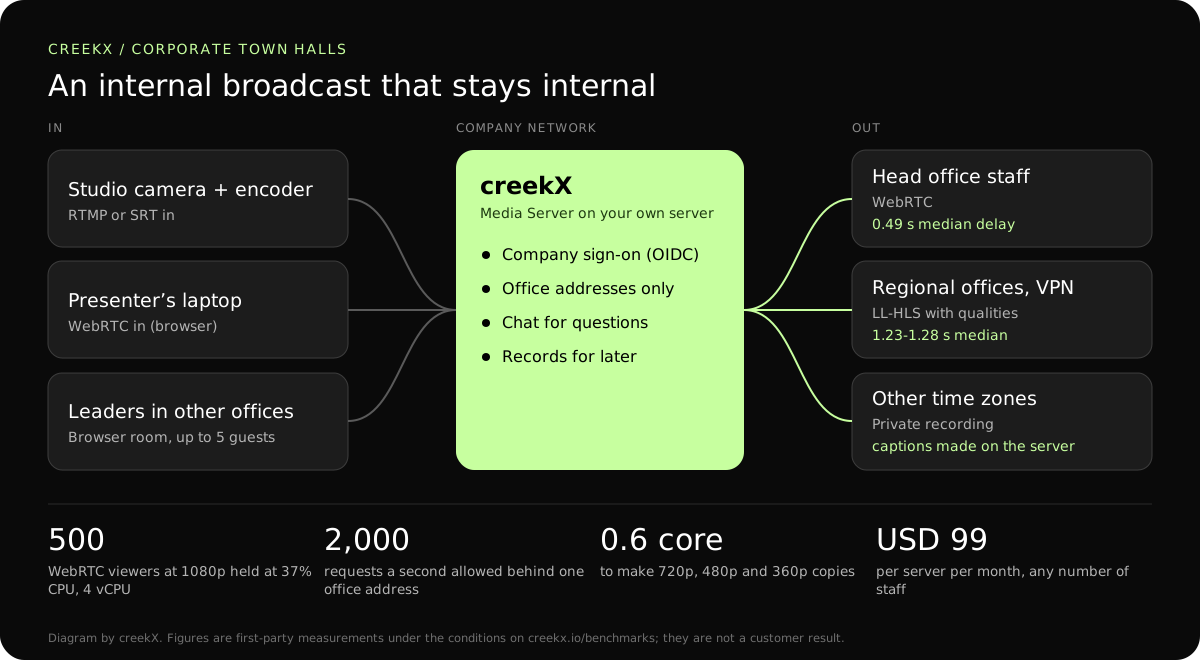
Internal broadcasts carry things you would not post publicly. CreekX streams them from servers you control, signs staff in with your identity provider and keeps the recording for those who missed it.
A town hall carries results before they are public, reorganisations and frank answers. The usual failure is not technical: someone forwards the link. The second usual failure is technical: three hundred people in one office all pull the stream down the same internet line and the picture stops for all of them.
Single sign-on through your OpenID Connect identity provider, and roles. Staff use their normal company login, and a leaver loses access when IT removes the account. Nobody needs a separate password.
Limit watching to office and VPN network addresses, so a forwarded link shows nothing outside. For offices with many viewers on one line, send a modest bitrate with several qualities, or put low-latency HLS behind a CDN.
Recordings go into a private library on your own disks, for staff in other time zones. Captions are made on the server with no audio leaving it; their accuracy has not been measured, so read them before publishing.

An encoder, or straight from a browser. A boardroom camera through OBS or a hardware encoder gives the best picture; a single presenter can go live from a laptop browser with no software, which needs the server at an https address.
Your OpenID Connect identity provider. Optionally restrict sign-in to your company email domain and set the role new people join as. SAML is not supported. Steps: single sign-on.
Into the library, for staff only. Turn on recording before going live, then check the recording plays before announcing it. Steps: check a live recording.
WebRTC needs UDP from the viewer to the server, which some corporate firewalls block. Test from each office before the day; low-latency HLS is the fallback. See streaming server ports and firewall rules.
| Leg | Protocol | Measured delay | Use it when |
|---|---|---|---|
| Studio encoder to server | RTMP, or SRT between sites | Not measured separately | A wired line from the boardroom or studio. |
| Server to head office | WebRTC | 0.49 s median, 0.68 s worst | People in the building also hear the room. |
| Server to regional offices and VPN | Low-latency HLS with several qualities | 1.23-1.28 s median | Mixed connections; only HTTPS allowed out. |
| Server to home workers | HLS | 3.4-3.8 s median, 4.4 s worst | Reach matters more than delay. |
| Replay | HLS from the library | On demand | Other time zones, with captions. |
From our test on a 4 vCPU, 8 GB server with about 890 Mbit/s of upload: 500 WebRTC viewers of one 1080p stream at 2.5 Mbit/s used 37% of the processor, and several qualities cost about 0.6 of a core for one stream.
Rehearse with real staff in every office a week before, not with the IT team alone. The event rehearsal checklist lists what to check.
In a first-party test on 13 October 2026, CreekX 2026.10.13 measured a median delay of 0.49 seconds for WebRTC, with a worst result of 0.68 seconds. Low-latency HLS measured 1.23-1.28 seconds at the median and 1.40 seconds at worst. Standard HLS measured 3.4-3.8 seconds at the median and 4.4 seconds at worst. The test used the standard one-line installer on an Ubuntu 24.04 cloud server with 4 vCPU, 8 GB memory, a 100 GB NVMe disk and about 890 Mbit/s upload bandwidth. The source was a real 1080p, 25 fps H.264 clip at 5 Mbit/s, sent from OBS and viewed on a laptop over the local network. Each step ran for 60 seconds. These are product measurements under the stated conditions, not results from a customer deployment or a promise for each viewer.
CreekX has no telemetry and can run with an offline licence and offline installation package supplied through sales. Video and the installed product’s operational account data remain on the customer-controlled server during local operation. Website and sales enquiries are separate. Enabling an off-site backup, external storage, restream destination or another outbound integration creates a corresponding outbound data path. Recorded video and library files are not encrypted by CreekX on the customer’s disks; use server-level disk encryption when encryption at rest is required. Viewer-security features have been checked through CreekX automated tests, but no formal third-party security certification or assessment has been completed.
The 14-day Media Server trial is available without a credit card. It includes the Media Server feature set with trial limits of five 24/7 channels, five restream destinations per stream and 500 library videos. Installation requires an internet connection. Your content is kept when the trial ends. Add a paid licence to continue using licensed features and creating channels after the trial and any applicable licence grace period.
Contact CreekX first if the deployment must be fully offline or air-gapped, will use several servers or more than 50 concurrent live streams, expects thousands of viewers, forms part of a tender, or needs installation, training or Enterprise support. CreekX currently operates one server per installation, so the team should check hardware, network capacity and product fit for a large audience before the trial.
Any OpenID Connect provider, which covers the common company directories. SAML is not supported. Testing so far used a test identity provider, so try yours on the trial. Two-step sign-in with an authenticator app is each person’s choice in creekX and cannot yet be required for everyone, so enforce it at your identity provider.
The processor is rarely the limit: a 4 vCPU server sent one 1080p stream to 500 WebRTC viewers at 37% CPU. The network is. Size large audiences with CreekX; a CDN in front of HLS carries more than one port can. We raised the per-address limit to 2,000 requests a second after a test showed a whole office behind one address being refused.
Yes, made on your server with whisper.cpp, so no audio leaves it. Their accuracy has not been measured yet. Steps: captions and search.
Three layers, used together: staff sign in with the company account, viewing is limited to office and VPN addresses, and any private links expire. The viewer connection log then shows who actually watched. Background: securing live streams.
Each viewer pulls a copy. 300 viewers at 1.5 Mbit/s is 450 Mbit/s of that office’s downlink. Lower the bitrate, turn on several qualities, or ask that office to watch together on a few screens. creekX has no peer-to-peer or office-cache delivery of its own.
Yes, in the stream’s chat, which a moderator can clear and police. creekX has no polls, hand-raising or breakout rooms; it is a broadcast, not a meeting.
Yes. Staff then need the office network or VPN to reach it, which is often the point. Going live from a browser and browser rooms need an https address with a certificate your staff devices trust.
Run the trial on a test server with a rehearsal first.