
Many stations, one public page
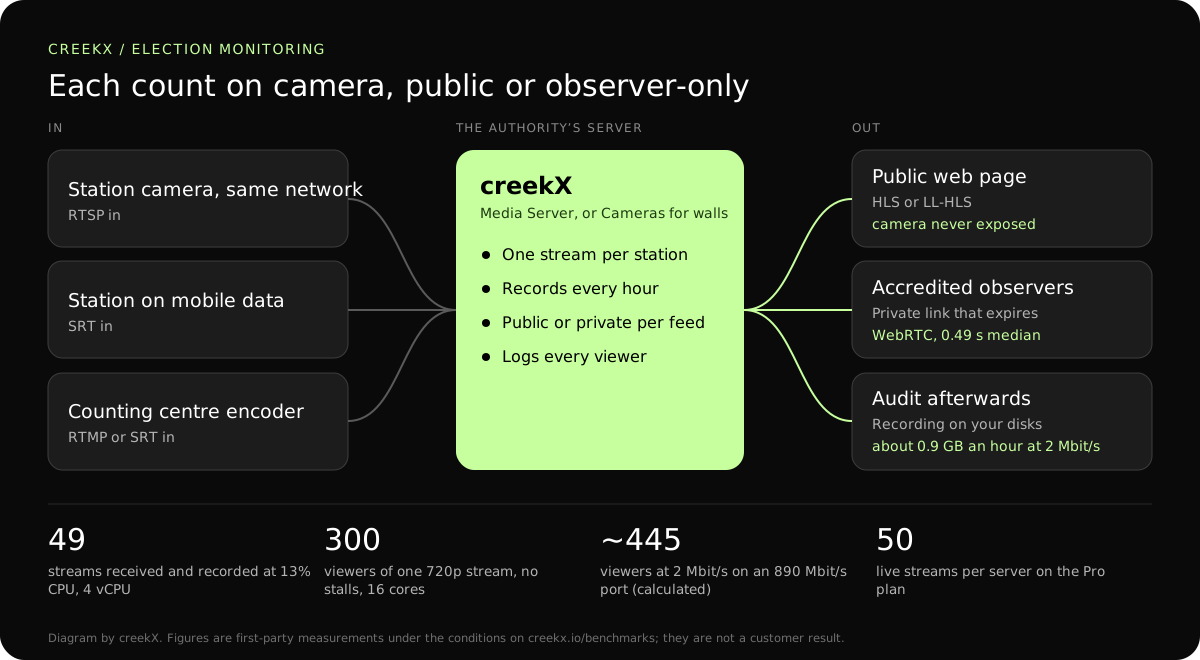
Bring in one stream per station and publish the ones meant for the public on your own web page. The server pulls each camera once and serves every viewer, so a station’s camera and its network never face the internet.
Election bodies and observers use live video to show counts happening. CreekX streams polling-station cameras to the public or to approved observers, records everything, and runs on servers the authority controls.
A camera on the count is cheap. The hard parts are the ones an election body is judged on afterwards: every station on air for the whole count, a recording that can be produced on request, a public page that does not fall over on results night, and proof of who was allowed to watch the restricted streams.
Bring in one stream per station and publish the ones meant for the public on your own web page. The server pulls each camera once and serves every viewer, so a station’s camera and its network never face the internet.
Give observers private watch links that expire, or limit watching to known networks such as a party office or a monitoring mission. One-time tokens stop a link being passed on, and the connection log shows who used it.
Record every station and keep the files on your own disks, in the country and on the hardware you choose. Removed videos are held for 30 days before deletion, which protects against a mistaken click.

The setup is the same for five stations or fifty. The longer walk-through is in the election live streaming guide.
IP cameras over RTSP where the station shares a network with the server, or an encoder or phone app sending SRT or RTMP where it does not. On mobile data use SRT, which re-sends lost packets. Steps: IP cameras and go live from an encoder.
Public streams embed on your website with a player served from your own server. Private streams use expiring links, tokens or address lists. The choice is per stream and can change during the day.
Keep recordings for audit, on servers you control. Each station’s recording appears under its own stream with its date and time, and can be downloaded as a file for a complaint or a court.
For the public page, a few seconds of delay costs nothing and buys reach. Keep WebRTC for the small group who act on what they see. More on the trade-off: WebRTC and low-latency HLS compared.
| Leg | Protocol | Measured delay | Why |
|---|---|---|---|
| Station camera on the same network as the server | RTSP pull | Not measured separately | Nothing to install at the station beyond the camera. |
| Station on mobile data or public internet | SRT with AES | The SRT latency you set | Survives packet loss and encrypts the feed. |
| Observers and returning officers | WebRTC | 0.49 s median, 0.68 s worst | They may be on the phone to the room they are watching. |
| The public | Low-latency HLS or HLS | 1.23-1.28 s or 3.4-3.8 s median | Plain HTTPS, any browser, and a CDN can carry it. |
From our test on a 4 vCPU, 8 GB server: 49 incoming 1080p streams at 5 Mbit/s, each recorded, used 13% of the processor and 1.5 GB of memory.
Run the whole setup once before election day, with every station connected for an hour. The event rehearsal checklist lists what to check.
On 13 October 2026, CreekX 2026.10.13 was installed using the standard one-line installer on Ubuntu 24.04. The test server had 4 vCPU, 8 GB memory, a 100 GB NVMe disk and about 890 Mbit/s upload bandwidth. It received a real 1080p, 25 fps H.264 test clip at 5 Mbit/s, and each test step ran for 60 seconds.
All 49 streams remained live. CreekX reported 13% CPU across the four cores, 1.5 GB memory use and 30.6 MB/s of disk writes. The CPU figures exclude the test tools.
The inputs were not validated physical cameras. The test therefore measures concurrent recorded streams under the stated conditions, not broad camera compatibility or a fixed number of cameras for another server.
At the tested 5 Mbit/s rate, one 1080p stream produces about 2.3 GB per hour, or about 55 GB per day. Retention requirements and disk performance should be included when sizing a deployment.
CreekX reports HTTPS for the application and video, encrypted WebRTC media, encrypted SRT ingest and AES-256-GCM protection for stored credentials. Recorded video is not encrypted by CreekX on the customer’s disks; deployments requiring encryption at rest need server-level disk encryption. Optional off-site backups, storage services or other outbound integrations create data paths outside the server when the customer enables them. CreekX currently has no formal security certification, independent penetration test or external audit.
CreekX Cameras is intended for mid-sized and large organisations with a technical owner and a need to view or record camera feeds on customer-controlled infrastructure.
It depends mostly on the server’s internet connection. On the 890 Mbit/s we measured, about 445 people at once at 2 Mbit/s across all public streams, a figure calculated from the port. In a separate test a 16-core server served 300 viewers of one 720p stream with no stalls at about 8 to 11% CPU. For a national audience, put HLS behind a CDN as described in HLS through a CDN, and rehearse it.
Yes. CreekX runs on servers you choose, in the location you choose, and sends no telemetry. A CDN or a restream to a social platform, if you enable one, is the only path out, and it is your decision.
No. It delivers and records video. It does not count, verify or analyse anything, and it does not timestamp video in a way that has been assessed as legal evidence. Recordings are ordinary files; their handling is your procedure.
For a count that lasts a day or a week, Media Server is usually enough: it pulls each camera by its RTSP or SRT address, records it and publishes it, for up to 50 streams on the Pro plan. Choose CreekX Cameras when you want a control-room wall, a recording timeline and per-site permissions for staff.
A camera, power and a network path to the server. Plan for upload of about twice the stream’s bitrate: 4 Mbit/s for a 720p stream at 2 Mbit/s. Where the line is poor, send a lower bitrate rather than a broken picture.
That station’s stream stops until the line returns, and the gap is visible in its recording. creekX reconnects to a pulled camera by itself. If an unbroken record matters more than the live view, record at the station as well.
Yes. Private links carry an expiry you choose, and one action revokes every private link at once when the count closes. Steps: who may watch and stream.
Share the number of stations, who should watch and how long recordings must be kept, and test it well before the day.