
Each building has its own system
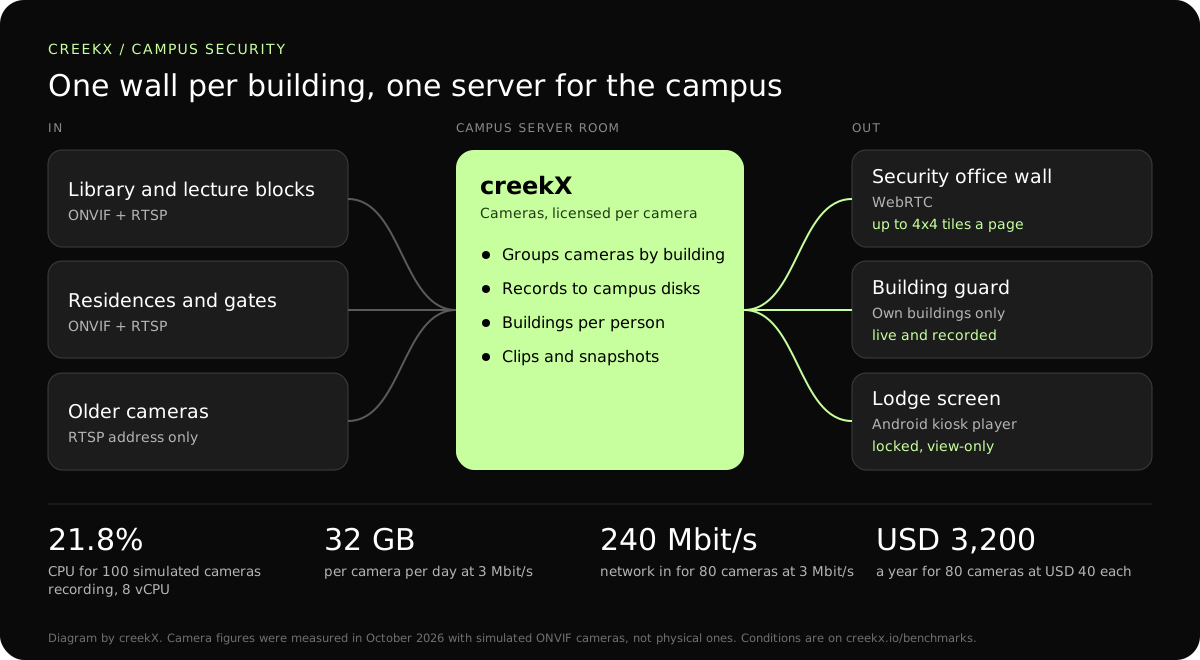
Bring ONVIF and RTSP cameras into one place, whatever brand each building has. The cameras stay where they are; creekX connects to them over the campus network.
Universities, schools and companies run cameras across many buildings. CreekX Cameras groups them by building, records them and lets each guard or manager see only their own.
A campus grows a building at a time, and each building arrives with the camera system its contractor preferred. The security office ends up with a different viewer for the library, the residences and the car parks, and reviewing one incident that crossed three buildings takes an afternoon.
Bring ONVIF and RTSP cameras into one place, whatever brand each building has. The cameras stay where they are; creekX connects to them over the campus network.
Limit each person to their buildings. A residence warden sees the residences, the security office sees everything, and the server enforces the difference.
Play back by time and save clips. Move through a camera’s timeline to the minute, then save a clip or a snapshot to hand over, instead of exporting hours of footage.
Give each camera a site name; they appear together. Find cameras with ONVIF discovery from the server, or add an RTSP address by hand for a camera that does not answer.
Walls of up to 4x4 tiles, on a TV or a laptop. A lodge or reception screen can run the locked Android kiosk player, which shows one view and gives no controls.
Save clips and snapshots for an incident. Recording is continuous to your own disks, and the viewer log records who looked at which camera and when.
| Leg | Protocol | Figure | Notes |
|---|---|---|---|
| Camera to server on the campus network | RTSP video, ONVIF control | 3 Mbit/s per 1080p camera in our test | Stays on your network. Nothing goes to a camera cloud. |
| A satellite campus to the server | SRT with an AES passphrase | Not measured separately | Encrypted across the internet; re-sends lost packets. |
| Server to the security office wall | WebRTC | 0.49 s median, 0.68 s worst | Guards see events as they happen. |
| Server to a manager’s laptop off campus | Low-latency HLS over HTTPS | 1.23-1.28 s median | Through a VPN or other path you provide. |
In our test on 15 October 2026 an 8 vCPU, 16 GB server recorded 100 simulated ONVIF cameras at 1080p and 3 Mbit/s at 21.8% CPU and about 1.1 GB of memory. The same class of server covers this example with room to spare.
The disks cost more than the licence. Decide the retention period first, because it sets the storage bill. Not measured: physical cameras, H.265, and walls and recording under load together.
On 13 October 2026, CreekX 2026.10.13 was installed using the standard one-line installer on Ubuntu 24.04. The test server had 4 vCPU, 8 GB memory, a 100 GB NVMe disk and about 890 Mbit/s upload bandwidth. It received a real 1080p, 25 fps H.264 test clip at 5 Mbit/s, and each test step ran for 60 seconds.
All 49 streams remained live. CreekX reported 13% CPU across the four cores, 1.5 GB memory use and 30.6 MB/s of disk writes. The CPU figures exclude the test tools.
The inputs were not validated physical cameras. The test therefore measures concurrent recorded streams under the stated conditions, not broad camera compatibility or a fixed number of cameras for another server.
At the tested 5 Mbit/s rate, one 1080p stream produces about 2.3 GB per hour, or about 55 GB per day. Retention requirements and disk performance should be included when sizing a deployment.
CreekX reports HTTPS for the application and video, encrypted WebRTC media, encrypted SRT ingest and AES-256-GCM protection for stored credentials. Recorded video is not encrypted by CreekX on the customer’s disks; deployments requiring encryption at rest need server-level disk encryption. Optional off-site backups, storage services or other outbound integrations create data paths outside the server when the customer enables them. CreekX currently has no formal security certification, independent penetration test or external audit.
CreekX Cameras is intended for mid-sized and large organisations with a technical owner and a need to view or record camera feeds on customer-controlled infrastructure.
Yes. Limit each person to named sites. The limit covers live video, recordings and clips, and it is enforced by the server, so a shared link does not get round it.
No analytics are included in the current release: no motion, person or vehicle alerts. creekX alerts when a camera goes offline. If your policy depends on analytics, say so before the pilot.
No. CreekX Cameras is licensed separately, per camera: USD 60 per camera per year up to 16 cameras and USD 40 from 17 to 100. Media Server is USD 99 per server each month and is the product for lectures and events, described under live classes.
Cameras times bitrate times days. One 1080p camera at 3 Mbit/s writes about 32 GB a day. 80 cameras write about 2.6 TB a day, so 14 days needs about 36 TB and 30 days about 77 TB. Lowering a camera’s bitrate lowers this in proportion.
Each camera sends its stream to the server all day: 80 cameras at 3 Mbit/s is 240 Mbit/s arriving at the server’s port. Put the server where the building links meet, and keep cameras on their own network segment.
Yes, through any OpenID Connect provider. SAML is not supported. Steps: single sign-on.
Cameras with ONVIF or an RTSP address. Cameras that rely only on ONVIF Media2 are not supported yet, and our tests used simulated cameras, so check your models in the pilot.
Share the number of cameras, buildings and people who need access, and CreekX will size it.