
Screens get tampered with
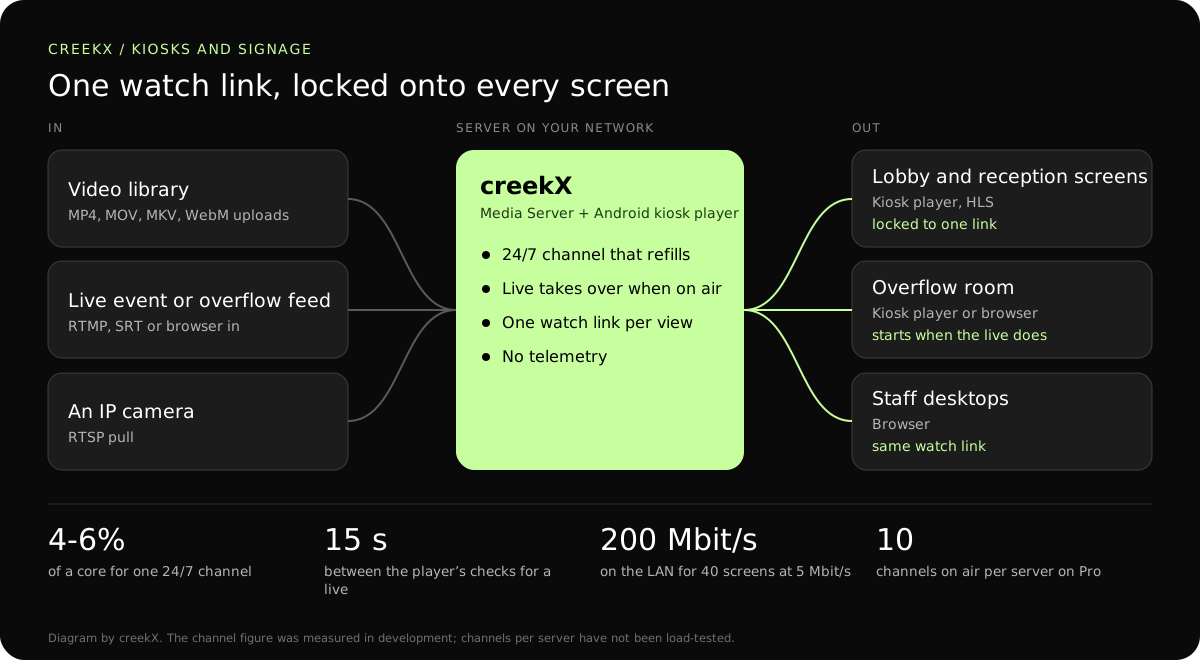
The Android kiosk player locks the device to one watch link using Android’s lock-task mode. There is no address bar, no home button and no way out except a hidden long-press and an admin PIN.
Lobbies, venues and shops want a live feed or a looping channel on a screen nobody can tamper with. CreekX serves the stream, and its Android kiosk player locks a screen to one watch link.
A screen in a public place has one job, and a tablet or TV stick running a browser is easy to pull away from it. A visitor taps out, an update dialog appears, the stream stalls and nobody reloads the page. By the afternoon the reception screen shows a home screen and a low-battery warning.
The Android kiosk player locks the device to one watch link using Android’s lock-task mode. There is no address bar, no home button and no way out except a hidden long-press and an admin PIN.
Play a 24/7 channel from your video library. The schedule refills itself, so the screen never reaches the end of a playlist and goes blank.
Show an overflow room or a live feed. The player checks every 15 seconds and starts playing by itself when the stream goes live, then returns to waiting when it ends.
A 24/7 channel or a live stream. Upload videos, arrange the channel and put it on air, or create a stream for a live source. Either way you end with one watch link. Steps: put a video library on air.
Install the kiosk player and point it at a watch link by typing it or scanning its QR code, and choose an admin PIN. For a lock with no prompt, the app must be the device owner, which Android allows only on a factory-reset device with no accounts on it.
Change the channel; every screen follows. The screens hold only a link, so new videos, a new schedule or a live takeover happen on the server and need no visit to the screens.
The kiosk player plays HLS, which favours steady playback over low delay. That suits a looping channel. Where a screen must match a stage in the same building, use a browser with WebRTC instead.
The source side is unchanged: a channel plays files from the library, and a live arrives by RTMP, SRT, RTSP or a browser.
| Screen | Protocol | Measured delay | Notes |
|---|---|---|---|
| Lobby screen on a looping channel | HLS in the kiosk player | 3.4-3.8 s median | Delay is irrelevant for recorded content. |
| Overflow room | HLS in the kiosk player | 3.4-3.8 s median, 4.4 s worst | Fine when the room cannot hear the stage. |
| Screen beside the stage | WebRTC in a browser | 0.49 s median, 0.68 s worst | When people can see both the stage and the screen. |
| Desktop or phone | Low-latency HLS in a browser | 1.23-1.28 s median | The same watch link opens anywhere you allow. |
A channel is a light load: 4 to 6% of a core each in development, and delivering to screens on a local network is limited by the switch, not the server.
Not measured: the number of channels one server carries, and the player across a wide range of Android devices. Try one screen and one channel on the trial first.
In a first-party test on 13 October 2026, CreekX 2026.10.13 measured a median delay of 0.49 seconds for WebRTC, with a worst result of 0.68 seconds. Low-latency HLS measured 1.23-1.28 seconds at the median and 1.40 seconds at worst. Standard HLS measured 3.4-3.8 seconds at the median and 4.4 seconds at worst. The test used the standard one-line installer on an Ubuntu 24.04 cloud server with 4 vCPU, 8 GB memory, a 100 GB NVMe disk and about 890 Mbit/s upload bandwidth. The source was a real 1080p, 25 fps H.264 clip at 5 Mbit/s, sent from OBS and viewed on a laptop over the local network. Each step ran for 60 seconds. These are product measurements under the stated conditions, not results from a customer deployment or a promise for each viewer.
CreekX has no telemetry and can run with an offline licence and offline installation package supplied through sales. Video and the installed product’s operational account data remain on the customer-controlled server during local operation. Website and sales enquiries are separate. Enabling an off-site backup, external storage, restream destination or another outbound integration creates a corresponding outbound data path. Recorded video and library files are not encrypted by CreekX on the customer’s disks; use server-level disk encryption when encryption at rest is required. Viewer-security features have been checked through CreekX automated tests, but no formal third-party security certification or assessment has been completed.
The 14-day Media Server trial is available without a credit card. It includes the Media Server feature set with trial limits of five 24/7 channels, five restream destinations per stream and 500 library videos. Installation requires an internet connection. Your content is kept when the trial ends. Add a paid licence to continue using licensed features and creating channels after the trial and any applicable licence grace period.
Contact CreekX first if the deployment must be fully offline or air-gapped, will use several servers or more than 50 concurrent live streams, expects thousands of viewers, forms part of a tender, or needs installation, training or Enterprise support. CreekX currently operates one server per installation, so the team should check hardware, network capacity and product fit for a large audience before the trial.
Android devices, in landscape. It has not been tested across the range of TV boxes and tablets, so test your exact model before buying many. It plays HLS and picks the quality for the bandwidth.
A 24/7 channel plays a schedule you build from your library, and a live can take over. It is one programme per channel: there are no per-screen playlists, zones, tickers or layouts. Screens that need different content point at different channels.
Yes, if the server is on the same network. The player talks only to the watch link’s own host. A fully offline server needs the offline package and licence supplied through sales.
Each screen pulls its own copy. Forty screens at 5 Mbit/s is 200 Mbit/s on the local network, all day. Use a lower bitrate for small screens: 2 Mbit/s at 720p is 80 Mbit/s for the same forty.
The player keeps retrying, backing off from 2 seconds to 30, and resumes by itself. If the link was replaced or revoked it says so on screen and keeps checking every minute. After a power cut the device boots straight into the player.
Long-press the top-left corner for about a second and enter the admin PIN. That unpins the app and opens setup; saving setup locks it again. The PIN is stored salted and hashed.
Yes. Pull an IP camera into a stream by its RTSP address and give the screen that stream’s watch link. A wall of many cameras on one screen is the CreekX Cameras product.
Install the kiosk player on one device with a test channel first.