
Build one working integration at a time
New recording APIs: replay an ordinary live stream and save a highlight. Upgrade your server before using those operations.
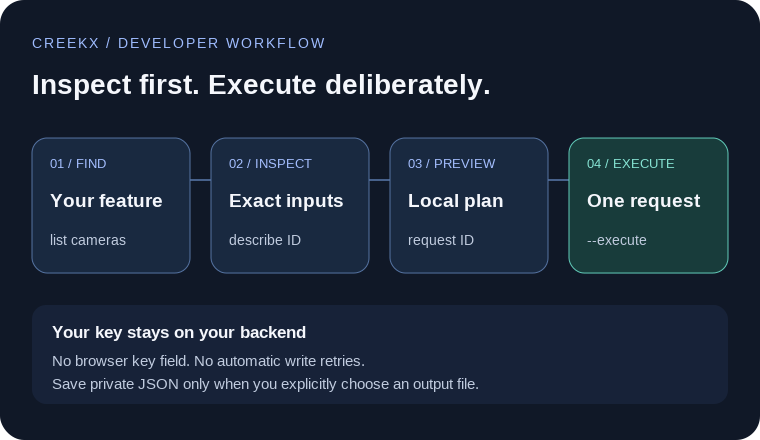
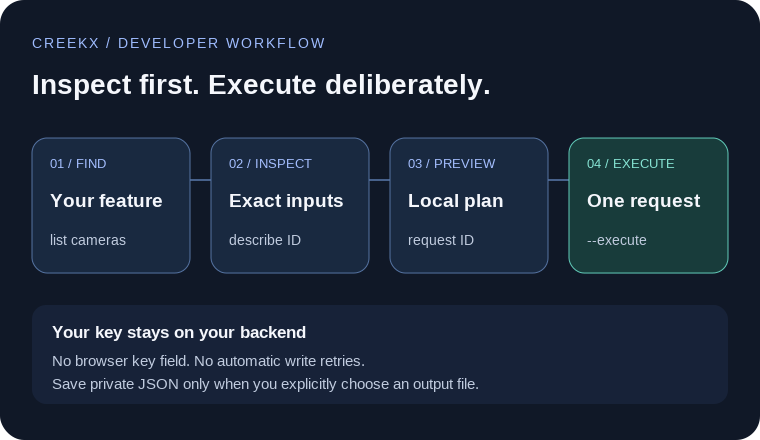
Find the feature. Inspect its inputs. Preview one request. Run it against your own server and check the result. This toolbox covers the documented Media Server and Cameras API, without putting your API key into a website.
On this page
1. Download the toolbox
Use Node.js 22 or newer. The tools need no npm dependencies. Save all three files in one private project folder:
- API runner and connection checks
- Shared configuration and safe error handling
- Versioned API catalogue and schemas
macOS or Linux:
mkdir creekx-developer-tools
cd creekx-developer-tools
for file in creekx-toolbox.mjs sdk-common.mjs developer-api.json; do
  curl -fsSLO "https://creekx.io/docs/examples/$file"
done
node creekx-toolbox.mjs --help
Windows PowerShell:
New-Item -ItemType Directory creekx-developer-tools
Set-Location creekx-developer-tools
foreach ($file in 'creekx-toolbox.mjs','sdk-common.mjs','developer-api.json') {
  Invoke-WebRequest "https://creekx.io/docs/examples/$file" -OutFile $file
}
node creekx-toolbox.mjs --help
The catalogue matches the documented API for release 2026.11.21. Check
your server's /openapi.json if it runs an older version. These tools do not
install or upgrade your server.
2. Find a feature before choosing a request
node creekx-toolbox.mjs list
node creekx-toolbox.mjs list cameras
node creekx-toolbox.mjs describe getStreamsCameraTimeline
These commands work offline. list shows operation IDs, methods, paths and
authentication. describe expands the JSON body schema and lists required
parameters, enums, bounds and response content types. For a visual list, use the
searchable API reference by feature.
An operation marked reference-only needs a session, viewer link, edge
credential or another flow; the runner will refuse it. Binary uploads, CSV, HLS, DASH and
WebRTC need their protocol-specific clients. A successful JSON request does not verify
video playback.
3. Check your connection and permissions
Create a local .env file. Add it and response files to your ignore rules.
Replace the origin and key privately:
CREEKX_SERVER=https://video.example.com
CREEKX_API_KEY=REPLACE_WITH_YOUR_BACKEND_API_KEY
node --env-file=.env creekx-toolbox.mjs doctor
The doctor makes five sequential read requests: API liveness at /healthz,
streams, assets, channels and webhooks. It reports HTTP status and page counts, never
response values. It continues the remaining checks after a failure and exits
unsuccessfully if any failed. A restricted role may correctly receive 403 for
some resources.
This checks API access, not encoder connectivity, a complete paginated inventory, camera accuracy or available capacity. A healthy API does not mean a channel is on air.
4. Preview, then run one read request
node --env-file=.env creekx-toolbox.mjs request getAssets --query limit=10
node --env-file=.env creekx-toolbox.mjs request getAssets --query limit=10 --execute
The first command checks the documented parameter names and basic scalar constraints
without contacting the server. The second sends one request. For paginated routes,
itemsOnThisPage is only the current page and hasNextPage says
whether a cursor remains. To inspect the cursor and records locally:
node --env-file=.env creekx-toolbox.mjs request getAssets --query limit=10 --execute --output assets-page.jsonKeep response files private. They can contain tokens, addresses, personal data or configuration. The runner creates a new file with restrictive permissions where supported and refuses to overwrite an existing file. It never prints the response values to the terminal. On Windows, use a folder accessible only to your account; creation mode is not a substitute for folder access controls.
For the next page, read nextCursor privately and pass it as
--query cursor=VALUE. Stop when it is null. Do not put a cursor or token in a
shared terminal transcript.
5. Make a deliberate JSON change
Start on a development installation. Inspect the request first, then put the exact JSON
body into a local file. For example, save {"name":"Integration test"} as
request.json:
node creekx-toolbox.mjs describe createStreams
node --env-file=.env creekx-toolbox.mjs request createStreams --body request.json --idempotency-key integration-stream-001
node --env-file=.env creekx-toolbox.mjs request createStreams --body request.json --idempotency-key integration-stream-001 --execute --apply --output created-stream.json
--execute enables a network request. --apply is also required
for POST, PUT, PATCH and DELETE, even where POST only computes a preview. No request is
retried automatically. The dry run parses JSON and checks parameters; the server performs
full body validation, licensing and permission checks.
Only operations that explicitly document idempotency-key accept that option.
Stream provisioning requires server 2026.11.17 or newer. Use the same key and body to
recover an uncertain creation within the server's one-day window; a new operation needs a
new key. Other writes need their own reconciliation strategy. Read the
tested provisioning recipe before building retry
logic.
Read the ID from the private response file, then inspect it with getStreams.
Delete only the test resource you created when finished. Creating a stream neither starts
an encoder nor creates a public watch link.
6. Work through the features in order
Each row starts with an inspection task. Use its feature ID with list, then
describe the chosen operation. The reference lists the exact IDs and schemas;
use the linked guide for product behaviour and prerequisites.
| Feature ID | First useful integration | What to check next |
|---|---|---|
streams |
List streams, inspect status and encoder health | Use a real publisher and viewer to verify the media path separately. |
security |
Issue expiring playback from your backend | Expiry, one-viewer use and revocation; never ship an API key to a client. |
library |
Page through videos and inspect readiness | Follow nextCursor. Upload bytes with the documented multipart or resumable client. |
channels |
Inspect channels and on-air state | Provision with plans, then check actual playback and ready assets. |
schedules |
Read one explicit programme window | Use UTC from/to values. Building can replace blocks; review warnings. |
plans |
Inspect a proposed change and its outcomes | Approve and apply separately; poll until settled and inspect failures. |
destinations |
Inspect restream destinations | Verify the receiving platform; a saved destination is not proof of delivery. |
cameras |
Inspect sites, recording windows and detections | Licensed access, explicit time range and available recordings. Detection boxes describe analysed stills. |
captions |
Read caption state and search transcripts | Check worker configuration and generation state before downloading WebVTT. |
chat |
Read chat before moderating a message | Hide, show, block and clear have different effects; test with separate users. |
rooms |
Inspect the host's room state | Use the conferencing client for media and keep invite and seat secrets private. |
webhooks |
Receive and verify signed events | Raw body, timestamp tolerance, durable work queue and idempotent processing. |
identity |
Inspect users; manage API keys while signed in | Least privilege and forbidden-role tests. SSO login uses a browser flow. |
storage |
Inspect recording-copy configuration | A bucket test contacts storage. Verify copied objects and retention separately. |
monitoring |
Inspect system health and channel incidents | Liveness differs from readiness and on-air health. Keep diagnostic exports private. |
audience |
Read an explicit usage month | Distinguish observed viewers from bandwidth estimates and assumptions. |
settings |
Inspect settings and entitlements | Apply a narrow patch; record before/after and verify the changed behaviour. |
Browser, React Native, Flutter and Python applications should use the appropriate SDK guide. These local Node tools help your backend inspect and exercise APIs; they do not add native SDK methods or verify mobile-device playback. CreekX Agents has its own operator API.
7. Verify an exported evidence file
Save the
streaming checksum verifier
beside sdk-common.mjs. Export a clip in Cameras and copy the SHA-256 from its
evidence record. Compare the downloaded bytes locally:
node verify-evidence.mjs clip.mp4 EXPECTED_64_CHARACTER_SHA256Replace the placeholder with the actual checksum. The tool reads the file in chunks and uploads nothing. It exits unsuccessfully on mismatch. A match establishes byte integrity against the supplied checksum; it does not establish capture authenticity, prove a timestamp or provide a chain of custody.
8. Diagnose failures without blind retries
- 401: check the key and configured origin privately.
- 403: check role, site restrictions, licence and feature configuration.
- 404: check the resource ID and installed API version.
-
400 or 422: compare the body with
describeand inspect server-side validation privately. - 429 or 503: respect server retry advice and reconcile a write before repeating it.
- Timeout or connection loss: outcome is uncertain. Check the resource or plan before creating another.
The catalogue includes verified server corrections: liveness uses the origin root, API-key management requires a signed-in person, and quota forecasting needs an explicit channel count. These differences are checked by the local tools instead of relying only on the specification.
The runner refuses redirects, permits plaintext HTTP only on loopback, uses a 15-second request timeout and limits JSON request and response bodies to 1 MiB. Large results need narrower queries or the typed SDK. Error response bodies are not printed or saved. A reserved output file can remain empty after a failed request; empty files are not verified responses.
For application code, use the runnable SDK recipes. For repeatable read-only API checks in Postman, import the starter collection.